Chaos Engineering on Amazon EKS Using AWS Fault Injection Service (FIS)
This lab walks you through running AWS Fault Injection Service (FIS) experiments on an EKS cluster to test application resilience using a fully managed.

Overview
AWS FIS is a managed AWS service purpose-built for running controlled fault injection experiments on AWS resources. Unlike third-party tools such as Chaos Mesh or Litmus that require installing controllers inside the cluster, FIS integrates directly with the AWS ecosystem and offers several advantages:
- No agent installation — FIS pod actions use ephemeral containers to inject faults, rather than DaemonSets or sidecars that must be deployed on every node
- IAM-based access control — Permissions are managed entirely through IAM roles and policies, providing granular control consistent with the AWS security model
- CloudWatch integration — Stop conditions use CloudWatch alarms to automatically halt an experiment if the cluster becomes unhealthy
- Audit trail — All experiments are recorded in AWS CloudTrail, providing full visibility for compliance and post-mortem analysis
This lab walks you through running AWS Fault Injection Service (FIS) experiments on an EKS cluster to test application resilience using a fully managed, AWS-native chaos engineering platform.
In this lab, you will run three FIS experiments:
- Pod Delete (
aws:eks:pod-delete) — Deletes a backend-api pod to test Kubernetes self-healing - Node Group Termination (
aws:eks:terminate-nodegroup-instances) — Terminates 34% of EC2 instances to test workload redistribution - Pod Network Latency (
aws:eks:pod-network-latency) — Injects 200ms latency into backend-api pods to test degraded network behavior
This lab is self-contained — all infrastructure (VPC, EKS cluster, IAM roles, FIS experiment templates, CloudWatch alarms, sample application) is provisioned from scratch by Terraform. You do not need to complete any other lab first.
Objectives
- Deploy an EKS cluster with FIS experiment templates using Terraform
- Run an FIS pod-delete experiment to test self-healing
- Run an FIS node-termination experiment to test workload redistribution
- Run an FIS pod-network-latency experiment to test degraded network behavior
- Understand IAM roles, IRSA, and CloudWatch stop conditions for FIS
Prerequisites
Required Tools
| Tool | Minimum Version | Install Guide |
|---|---|---|
| AWS CLI | 2.x | Install AWS CLI |
| Terraform | >= 1.7 | Install Terraform |
| kubectl | >= 1.32 | Install kubectl |
Note: This lab does not require Helm — AWS FIS is a managed service that does not require installing a controller inside the cluster. All Kubernetes resources are deployed as plain manifests.
Required Knowledge
- Basic understanding of Kubernetes (Pods, Deployments, Services, Namespaces)
- Basic experience with EKS (or familiarity with managed Kubernetes)
- Understanding of IAM roles and IRSA (IAM Roles for Service Accounts)
- Basic Terraform experience (init, plan, apply)
AWS Account
- An active AWS account with permissions to create VPCs, EKS clusters, IAM roles, FIS experiment templates, and CloudWatch alarms
- AWS CLI already configured (
aws configure)
Architecture Overview
.png "Architecture Overview")
Step-by-Step Guide
Step 1: Create the Project Structure
Create the directory structure for the lab:
1
2
mkdir -p aws-fis-chaos-engineering/{terraform,k8s,scripts}
cd aws-fis-chaos-engineering
The final project structure will look like this:
aws-fis-chaos-engineering/
├── terraform/
│   ├── variables.tf                   # Input variables
│   ├── main.tf                        # VPC, EKS, providers
│   ├── fis.tf                         # FIS IAM roles + 3 experiment templates
│   ├── cloudwatch.tf                  # CloudWatch alarms (stop conditions)
│   ├── outputs.tf                     # Outputs (cluster, FIS IDs, alarms)
│   └── terraform.tfvars.example       # Example variable overrides
├── k8s/
│   ├── namespace.yaml                 # fis-lab namespace
│   ├── sample-app.yaml                # frontend, backend-api, database
│   └── fis-rbac.yaml                  # ServiceAccount + RBAC for FIS
└── scripts/
    ├── deploy.sh                      # Provision all infrastructure
    ├── destroy.sh                     # Clean up all resources
    └── run-fis-experiment.sh          # Run and monitor FIS experiments
Set the region so all AWS CLI commands in this lab use the correct region:
1
export AWS_DEFAULT_REGION=ap-southeast-1
Note: This lab deploys resources in
ap-southeast-1(Singapore). If you are using a different region, update the value interraform/terraform.tfvarsand export the appropriate region.
Step 2: Create the Terraform Files
Variables and Configuration
Create terraform/variables.tf:
This file defines the input variables for the lab — region, naming prefix, VPC CIDR, and Kubernetes version.
1
2
3
4
5
6
7
8
9
10
11
12
13
14
15
16
17
18
19
20
21
22
23
24
25
26
27
28
29
30
31
32
33
# =============================================================================
# variables.tf — AWS FIS Chaos Engineering Lab
# =============================================================================

variable "aws_region" {
  description = "AWS region for lab resources"
  type        = string
  default     = "ap-southeast-1"
}

variable "lab_name" {
  description = "Name prefix for all lab resources"
  type        = string
  default     = "aws-fis-chaos-lab"
}

# -----------------------------------------------------------------------------
# VPC
# -----------------------------------------------------------------------------
variable "vpc_cidr" {
  description = "CIDR block for the VPC"
  type        = string
  default     = "10.4.0.0/16"
}

# -----------------------------------------------------------------------------
# EKS Cluster
# -----------------------------------------------------------------------------
variable "kubernetes_version" {
  description = "Kubernetes version for the EKS cluster"
  type        = string
  default     = "1.32"
}
Main Infrastructure (VPC + EKS)
Create terraform/main.tf:
This file provisions the VPC with public/private subnets across 3 AZs, the EKS cluster with a managed node group, and configures the Kubernetes provider.
1
2
3
4
5
6
7
8
9
10
11
12
13
14
15
16
17
18
19
20
21
22
23
24
25
26
27
28
29
30
31
32
33
34
35
36
37
38
39
40
41
42
43
44
45
46
47
48
49
50
51
52
53
54
55
56
57
58
59
60
61
62
63
64
65
66
67
68
69
70
71
72
73
74
75
76
77
78
79
80
81
82
83
84
85
86
87
88
89
90
91
92
93
94
95
96
97
98
99
100
101
102
103
104
105
106
107
108
109
110
111
112
113
114
115
116
117
118
119
120
121
122
123
124
125
126
127
128
129
130
131
132
133
134
135
136
137
138
139
140
141
142
143
144
145
146
147
148
149
150
151
# =============================================================================
# main.tf — EKS Cluster for AWS FIS Chaos Engineering Lab
# Provisions VPC, EKS cluster, and node groups for FIS experiments
# =============================================================================

terraform {
  required_version = ">= 1.7"
  required_providers {
    aws = {
      source  = "hashicorp/aws"
      version = ">= 5.0"
    }
    kubernetes = {
      source  = "hashicorp/kubernetes"
      version = ">= 2.0"
    }
  }

  # Uncomment for remote state (recommended for team environments):
  # backend "s3" {
  #   bucket = "your-terraform-state-bucket"
  #   key    = "devops-blog-labs/kubernetes-eks/aws-fis-chaos-engineering/terraform.tfstate"
  #   region = "ap-southeast-1"
  # }
}

provider "aws" {
  region = var.aws_region

  default_tags {
    tags = local.common_tags
  }
}

locals {
  common_tags = {
    Project   = "devops-blog-labs"
    Lab       = var.lab_name
    ManagedBy = "terraform"
  }

  azs = slice(data.aws_availability_zones.available.names, 0, 3)
}

data "aws_availability_zones" "available" {
  state = "available"
}

# =============================================================================
# VPC — Public and private subnets across 3 AZs
# =============================================================================
module "vpc" {
  source  = "terraform-aws-modules/vpc/aws"
  version = "~> 5.0"

  name = "${var.lab_name}-vpc"
  cidr = var.vpc_cidr

  azs             = local.azs
  private_subnets = [for i, az in local.azs : cidrsubnet(var.vpc_cidr, 4, i)]
  public_subnets  = [for i, az in local.azs : cidrsubnet(var.vpc_cidr, 4, i + 4)]

  enable_nat_gateway   = true
  single_nat_gateway   = true  # Cost optimization: single NAT
  enable_dns_hostnames = true
  enable_dns_support   = true

  # Tags required for EKS
  public_subnet_tags = {
    "kubernetes.io/role/elb"                    = 1
    "kubernetes.io/cluster/${var.lab_name}-eks" = "shared"
  }

  private_subnet_tags = {
    "kubernetes.io/role/internal-elb"           = 1
    "kubernetes.io/cluster/${var.lab_name}-eks" = "shared"
  }

  tags = local.common_tags
}

# =============================================================================
# EKS Cluster — Kubernetes 1.32+ with managed node groups
# =============================================================================
module "eks" {
  source  = "terraform-aws-modules/eks/aws"
  version = "~> 20.0"

  cluster_name    = "${var.lab_name}-eks"
  cluster_version = var.kubernetes_version

  vpc_id     = module.vpc.vpc_id
  subnet_ids = module.vpc.private_subnets

  # Allow public access to API server for lab convenience
  cluster_endpoint_public_access = true

  # Grant the cluster creator admin access to Kubernetes API
  enable_cluster_creator_admin_permissions = true

  # Enable OIDC provider (required for IRSA / FIS service account)
  enable_irsa = true

  # EKS managed node groups
  eks_managed_node_groups = {
    system = {
      name           = "${var.lab_name}-ng"
      instance_types = ["t3.medium"]
      min_size       = 2
      max_size       = 4
      desired_size   = 3  # 3 nodes for chaos experiment headroom

      iam_role_use_name_prefix = false

      labels = {
        role = "system"
      }
    }
  }

  # Cluster addons
  cluster_addons = {
    coredns = {
      most_recent = true
    }
    kube-proxy = {
      most_recent = true
    }
    vpc-cni = {
      most_recent = true
    }
    amazon-cloudwatch-observability = {
      most_recent = true
    }
  }

  tags = local.common_tags
}

# =============================================================================
# Kubernetes provider — configured after EKS is created
# =============================================================================
data "aws_eks_cluster_auth" "cluster" {
  name = module.eks.cluster_name
}

provider "kubernetes" {
  host                   = module.eks.cluster_endpoint
  cluster_ca_certificate = base64decode(module.eks.cluster_certificate_authority_data)
  token                  = data.aws_eks_cluster_auth.cluster.token
}
FIS Experiment Templates and IAM Roles
Create terraform/fis.tf:
This file defines the FIS execution role, the IRSA-based service account role, and three experiment templates (pod delete, node termination, network latency).
1
2
3
4
5
6
7
8
9
10
11
12
13
14
15
16
17
18
19
20
21
22
23
24
25
26
27
28
29
30
31
32
33
34
35
36
37
38
39
40
41
42
43
44
45
46
47
48
49
50
51
52
53
54
55
56
57
58
59
60
61
62
63
64
65
66
67
68
69
70
71
72
73
74
75
76
77
78
79
80
81
82
83
84
85
86
87
88
89
90
91
92
93
94
95
96
97
98
99
100
101
102
103
104
105
106
107
108
109
110
111
112
113
114
115
116
117
118
119
120
121
122
123
124
125
126
127
128
129
130
131
132
133
134
135
136
137
138
139
140
141
142
143
144
145
146
147
148
149
150
151
152
153
154
155
156
157
158
159
160
161
162
163
164
165
166
167
168
169
170
171
172
173
174
175
176
177
178
179
180
181
182
183
184
185
186
187
188
189
190
191
192
193
194
195
196
197
198
199
200
201
202
203
204
205
206
207
208
209
210
211
212
213
214
215
216
217
218
219
220
221
222
223
224
225
226
227
228
229
230
231
232
233
234
235
236
237
238
239
240
241
242
243
244
245
246
247
248
249
250
251
252
253
254
255
256
257
258
259
260
261
262
263
264
265
266
267
268
269
270
271
272
273
274
275
276
277
278
279
280
281
282
283
284
285
286
287
288
289
290
291
292
293
294
295
296
297
298
299
300
301
302
303
304
305
306
307
308
309
310
311
312
313
314
315
316
317
# =============================================================================
# fis.tf — AWS FIS Experiment Templates and IAM Roles
# Defines FIS execution role, service account IAM role (IRSA), and
# experiment templates for pod delete, node termination, and network latency
# =============================================================================

# =============================================================================
# Data Sources
# =============================================================================
data "aws_caller_identity" "current" {}

# =============================================================================
# FIS Execution Role — assumed by FIS to run experiments
# =============================================================================
resource "aws_iam_role" "fis_execution" {
  name = "${var.lab_name}-fis-execution-role"

  assume_role_policy = jsonencode({
    Version = "2012-10-17"
    Statement = [
      {
        Effect = "Allow"
        Principal = {
          Service = "fis.amazonaws.com"
        }
        Action = "sts:AssumeRole"
      }
    ]
  })

  tags = merge(local.common_tags, {
    Name = "${var.lab_name}-fis-execution-role"
  })
}

resource "aws_iam_role_policy_attachment" "fis_eks_access" {
  role       = aws_iam_role.fis_execution.name
  policy_arn = "arn:aws:iam::aws:policy/service-role/AWSFaultInjectionSimulatorEKSAccess"
}

resource "aws_iam_role_policy_attachment" "fis_network_access" {
  role       = aws_iam_role.fis_execution.name
  policy_arn = "arn:aws:iam::aws:policy/service-role/AWSFaultInjectionSimulatorNetworkAccess"
}

# Inline policy for permissions not covered by managed policies
resource "aws_iam_role_policy" "fis_execution_extra" {
  name = "${var.lab_name}-fis-execution-extra"
  role = aws_iam_role.fis_execution.id

  policy = jsonencode({
    Version = "2012-10-17"
    Statement = [
      {
        Effect = "Allow"
        Action = [
          "tag:GetResources",
          "eks:DescribeCluster",
          "ec2:DescribeInstances",
          "ec2:DescribeSubnets",
          "ec2:DescribeSecurityGroups",
          "ec2:DescribeVpcs",
          "eks:DescribeNodegroup",
          "ec2:TerminateInstances"
        ]
        Resource = "*"
      }
    ]
  })
}

# EKS access entry for FIS execution role (required for API auth mode)
resource "aws_eks_access_entry" "fis_execution" {
  cluster_name  = module.eks.cluster_name
  principal_arn = aws_iam_role.fis_execution.arn
  type          = "STANDARD"
}

resource "aws_eks_access_policy_association" "fis_execution" {
  cluster_name  = module.eks.cluster_name
  principal_arn = aws_iam_role.fis_execution.arn
  policy_arn    = "arn:aws:eks::aws:cluster-access-policy/AmazonEKSClusterAdminPolicy"

  access_scope {
    type = "cluster"
  }

  depends_on = [aws_eks_access_entry.fis_execution]
}

# =============================================================================
# FIS Service Account IAM Role — IRSA for FIS pod actions
# =============================================================================
resource "aws_iam_role" "fis_service_account" {
  name = "${var.lab_name}-fis-sa-role"

  assume_role_policy = jsonencode({
    Version = "2012-10-17"
    Statement = [
      {
        Effect = "Allow"
        Principal = {
          Federated = module.eks.oidc_provider_arn
        }
        Action = "sts:AssumeRoleWithWebIdentity"
        Condition = {
          StringEquals = {
            "${module.eks.oidc_provider}:sub" = "system:serviceaccount:fis-lab:fis-experiment-sa"
            "${module.eks.oidc_provider}:aud" = "sts.amazonaws.com"
          }
        }
      }
    ]
  })

  tags = merge(local.common_tags, {
    Name = "${var.lab_name}-fis-sa-role"
  })
}

resource "aws_iam_role_policy" "fis_service_account_policy" {
  name = "${var.lab_name}-fis-sa-policy"
  role = aws_iam_role.fis_service_account.id

  policy = jsonencode({
    Version = "2012-10-17"
    Statement = [
      {
        Effect = "Allow"
        Action = [
          "eks:DescribeCluster",
          "ec2:DescribeSubnets",
          "ec2:DescribeSecurityGroups",
          "ec2:DescribeVpcs"
        ]
        Resource = "*"
      }
    ]
  })
}

# =============================================================================
# FIS Experiment Template — Pod Delete
# Deletes one backend-api pod to test self-healing
# =============================================================================
resource "aws_fis_experiment_template" "pod_delete" {
  description = "Delete a backend-api pod in fis-lab namespace to test self-healing"
  role_arn    = aws_iam_role.fis_execution.arn

  stop_condition {
    source = "aws:cloudwatch:alarm"
    value  = aws_cloudwatch_metric_alarm.cpu_utilization.arn
  }

  stop_condition {
    source = "aws:cloudwatch:alarm"
    value  = aws_cloudwatch_metric_alarm.failed_node_count.arn
  }

  action {
    name      = "pod-delete-action"
    action_id = "aws:eks:pod-delete"

    target {
      key   = "Pods"
      value = "backend-api-pods"
    }

    parameter {
      key   = "kubernetesServiceAccount"
      value = "fis-experiment-sa"
    }
  }

  target {
    name           = "backend-api-pods"
    resource_type  = "aws:eks:pod"
    selection_mode = "COUNT(1)"

    parameters = {
      clusterIdentifier = module.eks.cluster_arn
      namespace         = "fis-lab"
      selectorType      = "labelSelector"
      selectorValue     = "app=backend-api"
    }
  }

  tags = {
    Name       = "${var.lab_name}-pod-delete"
    Experiment = "pod-delete"
    Lab        = var.lab_name
    ManagedBy  = "terraform"
  }
}

# =============================================================================
# FIS Experiment Template — Node Termination
# Terminates 34% of node group instances to test workload redistribution
# =============================================================================
resource "aws_fis_experiment_template" "node_termination" {
  description = "Terminate 34% of EKS node group instances to test workload redistribution"
  role_arn    = aws_iam_role.fis_execution.arn

  stop_condition {
    source = "aws:cloudwatch:alarm"
    value  = aws_cloudwatch_metric_alarm.cpu_utilization.arn
  }

  stop_condition {
    source = "aws:cloudwatch:alarm"
    value  = aws_cloudwatch_metric_alarm.failed_node_count.arn
  }

  action {
    name      = "node-termination-action"
    action_id = "aws:eks:terminate-nodegroup-instances"

    target {
      key   = "Nodegroups"
      value = "eks-nodegroup"
    }

    parameter {
      key   = "instanceTerminationPercentage"
      value = "34"
    }
  }

  target {
    name           = "eks-nodegroup"
    resource_type  = "aws:eks:nodegroup"
    selection_mode = "ALL"

    resource_arns = [module.eks.eks_managed_node_groups["system"].node_group_arn]
  }

  tags = {
    Name       = "${var.lab_name}-node-termination"
    Experiment = "node-termination"
    Lab        = var.lab_name
    ManagedBy  = "terraform"
  }
}

# =============================================================================
# FIS Experiment Template — Network Latency
# Injects 200ms latency (+50ms jitter) into backend-api pods for 5 minutes
# =============================================================================
resource "aws_fis_experiment_template" "network_latency" {
  description = "Inject network latency into backend-api pods to test degraded network behavior"
  role_arn    = aws_iam_role.fis_execution.arn

  stop_condition {
    source = "aws:cloudwatch:alarm"
    value  = aws_cloudwatch_metric_alarm.cpu_utilization.arn
  }

  stop_condition {
    source = "aws:cloudwatch:alarm"
    value  = aws_cloudwatch_metric_alarm.failed_node_count.arn
  }

  action {
    name      = "network-latency-action"
    action_id = "aws:eks:pod-network-latency"

    target {
      key   = "Pods"
      value = "backend-api-pods"
    }

    parameter {
      key   = "kubernetesServiceAccount"
      value = "fis-experiment-sa"
    }

    parameter {
      key   = "duration"
      value = "PT5M"
    }

    parameter {
      key   = "delayMilliseconds"
      value = "200"
    }

    parameter {
      key   = "jitterMilliseconds"
      value = "50"
    }

    parameter {
      key   = "sources"
      value = "0.0.0.0/0"
    }
  }

  target {
    name           = "backend-api-pods"
    resource_type  = "aws:eks:pod"
    selection_mode = "COUNT(3)"

    parameters = {
      clusterIdentifier = module.eks.cluster_arn
      namespace         = "fis-lab"
      selectorType      = "labelSelector"
      selectorValue     = "app=backend-api"
    }
  }

  tags = {
    Name       = "${var.lab_name}-network-latency"
    Experiment = "network-latency"
    Lab        = var.lab_name
    ManagedBy  = "terraform"
  }
}
CloudWatch Alarms (Stop Conditions)
Create terraform/cloudwatch.tf:
These CloudWatch alarms act as safety nets — FIS automatically stops an experiment if CPU utilization spikes above 80% or more than 1 node enters a failed state.
1
2
3
4
5
6
7
8
9
10
11
12
13
14
15
16
17
18
19
20
21
22
23
24
25
26
27
28
29
30
31
32
33
34
35
36
37
38
39
40
41
42
43
44
45
46
47
48
49
50
51
52
53
54
55
# =============================================================================
# cloudwatch.tf — CloudWatch Alarms for FIS Stop Conditions
# Monitors EKS cluster health and automatically stops FIS experiments
# if the cluster becomes unhealthy (CPU spike or node failures)
# =============================================================================

# =============================================================================
# CloudWatch Alarm — CPU Utilization
# Triggers when average node CPU exceeds 80% for 2 consecutive periods
# =============================================================================
resource "aws_cloudwatch_metric_alarm" "cpu_utilization" {
  alarm_name          = "${var.lab_name}-cpu-utilization"
  alarm_description   = "Stops FIS experiments when EKS node CPU utilization exceeds 80% for 2 consecutive minutes"
  namespace           = "ContainerInsights"
  metric_name         = "node_cpu_utilization"
  comparison_operator = "GreaterThanThreshold"
  threshold           = 80
  evaluation_periods  = 2
  period              = 60
  statistic           = "Average"
  treat_missing_data  = "notBreaching"

  dimensions = {
    ClusterName = module.eks.cluster_name
  }

  tags = merge(local.common_tags, {
    Name = "${var.lab_name}-cpu-utilization"
  })
}

# =============================================================================
# CloudWatch Alarm — Failed Node Count
# Triggers when more than 1 node is in a failed state
# =============================================================================
resource "aws_cloudwatch_metric_alarm" "failed_node_count" {
  alarm_name          = "${var.lab_name}-failed-node-count"
  alarm_description   = "Stops FIS experiments when more than 1 EKS node enters a failed state"
  namespace           = "ContainerInsights"
  metric_name         = "cluster_failed_node_count"
  comparison_operator = "GreaterThanThreshold"
  threshold           = 1
  evaluation_periods  = 1
  period              = 60
  statistic           = "Maximum"
  treat_missing_data  = "notBreaching"

  dimensions = {
    ClusterName = module.eks.cluster_name
  }

  tags = merge(local.common_tags, {
    Name = "${var.lab_name}-failed-node-count"
  })
}
Outputs
Create terraform/outputs.tf:
This file exports the cluster name, FIS template IDs, and CloudWatch alarm ARNs used by the deploy and experiment scripts.
1
2
3
4
5
6
7
8
9
10
11
12
13
14
15
16
17
18
19
20
21
22
23
24
25
26
27
28
29
30
31
32
33
34
35
36
37
38
39
40
41
42
43
44
45
46
47
48
49
50
51
52
53
54
55
56
57
58
59
60
61
62
63
64
65
66
67
68
69
70
71
72
73
74
75
76
77
78
# =============================================================================
# outputs.tf — AWS FIS Chaos Engineering Lab
# =============================================================================

# -----------------------------------------------------------------------------
# Cluster
# -----------------------------------------------------------------------------
output "cluster_name" {
  description = "Name of the EKS cluster"
  value       = module.eks.cluster_name
}

output "cluster_endpoint" {
  description = "Endpoint URL for the EKS cluster API server"
  value       = module.eks.cluster_endpoint
}

output "cluster_version" {
  description = "Kubernetes version running on the cluster"
  value       = module.eks.cluster_version
}

# -----------------------------------------------------------------------------
# Kubeconfig
# -----------------------------------------------------------------------------
output "kubeconfig_command" {
  description = "AWS CLI command to update kubeconfig for this cluster"
  value       = "aws eks update-kubeconfig --region ${var.aws_region} --name ${module.eks.cluster_name}"
}

# -----------------------------------------------------------------------------
# VPC
# -----------------------------------------------------------------------------
output "vpc_id" {
  description = "ID of the VPC"
  value       = module.vpc.vpc_id
}

# -----------------------------------------------------------------------------
# FIS
# -----------------------------------------------------------------------------
output "fis_execution_role_arn" {
  description = "ARN of the IAM role assumed by FIS to run experiments"
  value       = aws_iam_role.fis_execution.arn
}

output "fis_service_account_role_arn" {
  description = "ARN of the IAM role for the FIS Kubernetes service account (IRSA)"
  value       = aws_iam_role.fis_service_account.arn
}

output "fis_template_pod_delete_id" {
  description = "ID of the FIS experiment template for pod delete"
  value       = aws_fis_experiment_template.pod_delete.id
}

output "fis_template_node_termination_id" {
  description = "ID of the FIS experiment template for node termination"
  value       = aws_fis_experiment_template.node_termination.id
}

output "fis_template_network_latency_id" {
  description = "ID of the FIS experiment template for network latency"
  value       = aws_fis_experiment_template.network_latency.id
}

# -----------------------------------------------------------------------------
# CloudWatch
# -----------------------------------------------------------------------------
output "cloudwatch_alarm_cpu_arn" {
  description = "ARN of the CloudWatch alarm for CPU utilization (FIS stop condition)"
  value       = aws_cloudwatch_metric_alarm.cpu_utilization.arn
}

output "cloudwatch_alarm_failed_node_arn" {
  description = "ARN of the CloudWatch alarm for failed node count (FIS stop condition)"
  value       = aws_cloudwatch_metric_alarm.failed_node_count.arn
}
Example Variable Overrides
Create terraform/terraform.tfvars.example:
Copy this file to terraform.tfvars and adjust values if you want to use a different region or naming prefix.
1
2
3
4
5
6
7
8
9
10
# =============================================================================
# terraform.tfvars.example — AWS FIS Chaos Engineering Lab
# Copy this file to terraform.tfvars and adjust values as needed:
#   cp terraform.tfvars.example terraform.tfvars
# =============================================================================

aws_region         = "ap-southeast-1"
lab_name           = "aws-fis-chaos-lab"
vpc_cidr           = "10.4.0.0/16"
kubernetes_version = "1.32"
(Optional) Override defaults:
1
cp terraform/terraform.tfvars.example terraform/terraform.tfvars
Step 3: Create the Kubernetes Manifests
Namespace
Create k8s/namespace.yaml:
This creates a dedicated namespace for all lab resources, keeping them isolated from other workloads.
1
2
3
4
5
6
7
8
9
10
# =============================================================================
# namespace.yaml — Lab namespace for AWS FIS Chaos Engineering experiments
# =============================================================================
apiVersion: v1
kind: Namespace
metadata:
  name: fis-lab
  labels:
    app.kubernetes.io/part-of: aws-fis-chaos-engineering-lab
    purpose: fis-experiments
Sample Application
Create k8s/sample-app.yaml:
This deploys a multi-tier application with frontend (NGINX x3), backend-api (HTTP echo x3), and database (Redis x2) — the target workloads for FIS experiments.
1
2
3
4
5
6
7
8
9
10
11
12
13
14
15
16
17
18
19
20
21
22
23
24
25
26
27
28
29
30
31
32
33
34
35
36
37
38
39
40
41
42
43
44
45
46
47
48
49
50
51
52
53
54
55
56
57
58
59
60
61
62
63
64
65
66
67
68
69
70
71
72
73
74
75
76
77
78
79
80
81
82
83
84
85
86
87
88
89
90
91
92
93
94
95
96
97
98
99
100
101
102
103
104
105
106
107
108
109
110
111
112
113
114
115
116
117
118
119
120
121
122
123
124
125
126
127
128
129
130
131
132
133
134
135
136
137
138
139
140
141
142
143
144
145
146
147
148
149
150
151
152
153
154
155
156
157
158
159
160
161
162
163
164
165
166
167
168
169
170
171
172
173
174
175
176
177
178
179
180
181
182
183
184
185
186
187
188
189
190
191
192
193
194
195
196
197
198
199
200
201
202
203
204
205
206
207
# =============================================================================
# sample-app.yaml — Target application for AWS FIS chaos experiments
# Multi-replica deployment with frontend, backend, and Redis database
# =============================================================================

# -----------------------------------------------------------------------------
# Frontend — NGINX reverse proxy (3 replicas for resilience testing)
# -----------------------------------------------------------------------------
apiVersion: apps/v1
kind: Deployment
metadata:
  name: frontend
  namespace: fis-lab
  labels:
    app: frontend
    tier: web
    app.kubernetes.io/part-of: aws-fis-chaos-engineering-lab
spec:
  replicas: 3
  selector:
    matchLabels:
      app: frontend
  template:
    metadata:
      labels:
        app: frontend
        tier: web
    spec:
      containers:
                - name: nginx
          image: nginx:1.25-alpine
          ports:
                        - containerPort: 80
              name: http
          resources:
            requests:
              cpu: 50m
              memory: 64Mi
            limits:
              cpu: 200m
              memory: 128Mi
          readinessProbe:
            httpGet:
              path: /
              port: 80
            initialDelaySeconds: 5
            periodSeconds: 10
          livenessProbe:
            httpGet:
              path: /
              port: 80
            initialDelaySeconds: 10
            periodSeconds: 15
---
apiVersion: v1
kind: Service
metadata:
  name: frontend
  namespace: fis-lab
  labels:
    app: frontend
spec:
  selector:
    app: frontend
  ports:
        - port: 80
      targetPort: 80
      name: http
  type: ClusterIP

# -----------------------------------------------------------------------------
# Backend API — HTTP echo service (3 replicas)
# -----------------------------------------------------------------------------
---
apiVersion: apps/v1
kind: Deployment
metadata:
  name: backend-api
  namespace: fis-lab
  labels:
    app: backend-api
    tier: api
    app.kubernetes.io/part-of: aws-fis-chaos-engineering-lab
spec:
  replicas: 3
  selector:
    matchLabels:
      app: backend-api
  template:
    metadata:
      labels:
        app: backend-api
        tier: api
    spec:
      containers:
                - name: echo
          image: hashicorp/http-echo:0.2.3
          args:
                        - "-listen=:8080"
                        - '-text={"service":"backend-api","status":"healthy","hostname":"$(HOSTNAME)"}'
          env:
                        - name: HOSTNAME
              valueFrom:
                fieldRef:
                  fieldPath: metadata.name
          ports:
                        - containerPort: 8080
              name: http
          resources:
            requests:
              cpu: 50m
              memory: 64Mi
            limits:
              cpu: 200m
              memory: 128Mi
          readinessProbe:
            httpGet:
              path: /
              port: 8080
            initialDelaySeconds: 3
            periodSeconds: 10
          livenessProbe:
            httpGet:
              path: /
              port: 8080
            initialDelaySeconds: 5
            periodSeconds: 15
---
apiVersion: v1
kind: Service
metadata:
  name: backend-api
  namespace: fis-lab
  labels:
    app: backend-api
spec:
  selector:
    app: backend-api
  ports:
        - port: 8080
      targetPort: 8080
      name: http
  type: ClusterIP

# -----------------------------------------------------------------------------
# Database — Redis (2 replicas for resilience testing)
# -----------------------------------------------------------------------------
---
apiVersion: apps/v1
kind: Deployment
metadata:
  name: database
  namespace: fis-lab
  labels:
    app: database
    tier: data
    app.kubernetes.io/part-of: aws-fis-chaos-engineering-lab
spec:
  replicas: 2
  selector:
    matchLabels:
      app: database
  template:
    metadata:
      labels:
        app: database
        tier: data
    spec:
      containers:
                - name: redis
          image: redis:7.2-alpine
          ports:
                        - containerPort: 6379
              name: redis
          resources:
            requests:
              cpu: 50m
              memory: 64Mi
            limits:
              cpu: 200m
              memory: 128Mi
          readinessProbe:
            exec:
              command: ["redis-cli", "ping"]
            initialDelaySeconds: 5
            periodSeconds: 10
          livenessProbe:
            exec:
              command: ["redis-cli", "ping"]
            initialDelaySeconds: 10
            periodSeconds: 15
---
apiVersion: v1
kind: Service
metadata:
  name: database
  namespace: fis-lab
  labels:
    app: database
spec:
  selector:
    app: database
  ports:
        - port: 6379
      targetPort: 6379
      name: redis
  type: ClusterIP
FIS Service Account and RBAC
Create k8s/fis-rbac.yaml:
This creates the Kubernetes ServiceAccount (with IRSA annotation), Role, and RoleBinding that FIS needs to perform pod-level actions. The <FIS_SA_ROLE_ARN> placeholder is replaced by deploy.sh at deploy time.
1
2
3
4
5
6
7
8
9
10
11
12
13
14
15
16
17
18
19
20
21
22
23
24
25
26
27
28
29
30
31
32
33
34
35
36
37
38
39
40
41
42
43
44
45
46
47
48
49
50
51
52
53
54
55
56
57
58
59
60
61
62
63
64
65
66
67
# =============================================================================
# fis-rbac.yaml — ServiceAccount, Role, and RoleBinding for AWS FIS experiments
# Provides IRSA-based authentication and least-privilege RBAC for FIS pod actions
# =============================================================================

# -----------------------------------------------------------------------------
# ServiceAccount — Used by FIS pod actions via IRSA
# The role ARN annotation is replaced by deploy.sh with the actual IAM role ARN
# -----------------------------------------------------------------------------
apiVersion: v1
kind: ServiceAccount
metadata:
  name: fis-experiment-sa
  namespace: fis-lab
  labels:
    app.kubernetes.io/part-of: aws-fis-chaos-engineering-lab
  annotations:
    eks.amazonaws.com/role-arn: <FIS_SA_ROLE_ARN>

# -----------------------------------------------------------------------------
# Role — Namespace-scoped permissions required by FIS pod actions
# Ref: https://docs.aws.amazon.com/fis/latest/userguide/eks-pod-actions.html
# -----------------------------------------------------------------------------
---
apiVersion: rbac.authorization.k8s.io/v1
kind: Role
metadata:
  name: fis-experiment-role
  namespace: fis-lab
  labels:
    app.kubernetes.io/part-of: aws-fis-chaos-engineering-lab
rules:
    - apiGroups: [""]
    resources: ["configmaps"]
    verbs: ["get", "create", "patch", "delete"]
    - apiGroups: [""]
    resources: ["pods"]
    verbs: ["create", "list", "get", "delete", "deletecollection"]
    - apiGroups: [""]
    resources: ["pods/ephemeralcontainers"]
    verbs: ["update"]
    - apiGroups: [""]
    resources: ["pods/exec"]
    verbs: ["create"]
    - apiGroups: ["apps"]
    resources: ["deployments"]
    verbs: ["get"]

# -----------------------------------------------------------------------------
# RoleBinding — Binds the Role to the FIS ServiceAccount
# -----------------------------------------------------------------------------
---
apiVersion: rbac.authorization.k8s.io/v1
kind: RoleBinding
metadata:
  name: fis-experiment-binding
  namespace: fis-lab
  labels:
    app.kubernetes.io/part-of: aws-fis-chaos-engineering-lab
subjects:
    - kind: ServiceAccount
    name: fis-experiment-sa
    namespace: fis-lab
roleRef:
  kind: Role
  name: fis-experiment-role
  apiGroup: rbac.authorization.k8s.io
Step 4: Create the Shell Scripts
Deploy Script
Create scripts/deploy.sh:
This script validates prerequisites, provisions all AWS infrastructure with Terraform, configures kubeconfig, and deploys the Kubernetes manifests.
1
2
3
4
5
6
7
8
9
10
11
12
13
14
15
16
17
18
19
20
21
22
23
24
25
26
27
28
29
30
31
32
33
34
35
36
37
38
39
40
41
42
43
44
45
46
47
48
49
50
51
52
53
54
55
56
57
58
59
60
61
62
63
64
65
66
67
68
69
70
71
72
73
74
75
76
77
78
79
80
81
82
83
84
85
86
87
88
89
90
91
92
93
94
95
96
97
98
99
100
101
102
103
104
105
106
107
108
109
110
111
112
113
114
115
116
117
118
119
120
121
122
123
124
125
126
127
128
129
130
131
132
133
134
135
136
137
138
139
140
141
142
143
144
145
146
147
148
149
150
151
152
153
154
155
156
157
158
159
160
161
162
163
164
165
166
167
168
169
170
171
172
173
174
175
176
177
178
179
180
181
182
183
184
185
186
187
188
189
190
191
192
193
194
195
196
197
198
199
200
201
202
203
#!/bin/bash
set -euo pipefail

# =============================================================================
# deploy.sh — AWS FIS Chaos Engineering — Deploy
# Provisions VPC, EKS cluster, FIS experiment templates, deploys sample app
# =============================================================================

# Colors for output
RED='\033[0;31m'
GREEN='\033[0;32m'
YELLOW='\033[1;33m'
CYAN='\033[0;36m'
NC='\033[0m' # No Color

SCRIPT_DIR="$(cd "$(dirname "${BASH_SOURCE[0]}")" && pwd)"
LAB_DIR="$(dirname "$SCRIPT_DIR")"

echo -e "${CYAN}========================================${NC}"
echo -e "${CYAN}  AWS FIS Chaos Engineering — Deploy${NC}"
echo -e "${CYAN}========================================${NC}"
echo ""

# ---------------------------------------------------------------------------
# Step 1: Check prerequisites
# ---------------------------------------------------------------------------
echo -e "${YELLOW}[1/8] Checking prerequisites...${NC}"

# AWS CLI
if ! command -v aws &> /dev/null; then
    echo -e "${RED}ERROR: AWS CLI is not installed.${NC}"
    echo "  Install: https://docs.aws.amazon.com/cli/latest/userguide/getting-started-install.html"
    exit 1
fi

# AWS credentials configured
if ! aws sts get-caller-identity &> /dev/null 2>&1; then
    echo -e "${RED}ERROR: AWS credentials are not configured.${NC}"
    echo "  Run: aws configure"
    exit 1
fi

# Terraform
if ! command -v terraform &> /dev/null; then
    echo -e "${RED}ERROR: Terraform is not installed.${NC}"
    echo "  Install: https://developer.hashicorp.com/terraform/install"
    exit 1
fi

# Terraform version check (>= 1.7)
TF_VERSION=$(terraform version -json 2>/dev/null | python3 -c "import sys,json; print(json.load(sys.stdin)['terraform_version'])" 2>/dev/null || terraform version | head -1 | sed 's/[^0-9.]//g')
TF_MAJOR=$(echo "$TF_VERSION" | cut -d. -f1)
TF_MINOR=$(echo "$TF_VERSION" | cut -d. -f2)
if [ "$TF_MAJOR" -lt 1 ] || { [ "$TF_MAJOR" -eq 1 ] && [ "$TF_MINOR" -lt 7 ]; }; then
    echo -e "${RED}ERROR: Terraform >= 1.7 required (found $TF_VERSION).${NC}"
    exit 1
fi

# kubectl
if ! command -v kubectl &> /dev/null; then
    echo -e "${RED}ERROR: kubectl is not installed.${NC}"
    echo "  Install: https://kubernetes.io/docs/tasks/tools/"
    exit 1
fi

echo -e "${GREEN}  ✓ AWS CLI configured${NC}"
echo -e "${GREEN}  ✓ Terraform $TF_VERSION${NC}"
echo -e "${GREEN}  ✓ kubectl available${NC}"
echo ""

# ---------------------------------------------------------------------------
# Step 2: Display lab info
# ---------------------------------------------------------------------------
echo -e "${YELLOW}[2/8] Lab information${NC}"
echo "  Lab    : AWS FIS Chaos Engineering"
echo "  Track  : 2 — Kubernetes on AWS (EKS)"
echo "  Type   : AWS (Terraform + FIS + K8s manifests)"
echo "  Resources:"
echo "    - VPC with public/private subnets (3 AZs)"
echo "    - EKS cluster (Kubernetes 1.32)"
echo "    - System node group (t3.medium x3)"
echo "    - AWS FIS experiment templates (3)"
echo "    - CloudWatch alarms (2)"
echo "    - Sample multi-replica app"
echo ""
# ---------------------------------------------------------------------------
# Step 3: Cost warning
# ---------------------------------------------------------------------------
echo -e "${RED}========================================${NC}"
echo -e "${RED}    COST WARNING${NC}"
echo -e "${RED}========================================${NC}"
echo ""
echo "  Estimated cost: \$0.35 - \$0.80 per hour"
echo ""
echo "  Breakdown:"
echo "    EKS Control Plane  : \$0.10/hr"
echo "    EC2 t3.medium x3   : ~\$0.125/hr"
echo "    NAT Gateway        : \$0.045/hr + data"
echo "    EBS Volumes        : ~\$0.005/hr"
echo "    FIS                : \$0.10 per action-minute"
echo "    Total (approx)     : \$0.35 - \$0.80/hr"
echo ""
echo -e "  ${YELLOW}Run ./scripts/destroy.sh when done to avoid charges!${NC}"
echo ""
read -p "  Continue? (y/N): " CONFIRM
if [[ ! "$CONFIRM" =~ ^[Yy]$ ]]; then
    echo -e "${YELLOW}Aborted.${NC}"
    exit 0
fi
echo ""

# ---------------------------------------------------------------------------
# Step 4: Terraform init
# ---------------------------------------------------------------------------
echo -e "${YELLOW}[3/8] Running terraform init...${NC}"
terraform -chdir="$LAB_DIR/terraform" init

echo ""

# ---------------------------------------------------------------------------
# Step 5: Terraform apply
# ---------------------------------------------------------------------------
echo -e "${YELLOW}[4/8] Running terraform apply (this takes 15-20 minutes)...${NC}"
terraform -chdir="$LAB_DIR/terraform" apply -auto-approve

echo ""
# ---------------------------------------------------------------------------
# Step 6: Configure kubeconfig
# ---------------------------------------------------------------------------
echo -e "${YELLOW}[5/8] Configuring kubeconfig...${NC}"
CLUSTER_NAME=$(terraform -chdir="$LAB_DIR/terraform" output -raw cluster_name)
AWS_REGION=$(terraform -chdir="$LAB_DIR/terraform" output -raw cluster_endpoint | sed -n 's/.*\.\([a-z]*-[a-z]*-[0-9]*\)\..*/\1/p')
AWS_REGION=${AWS_REGION:-ap-southeast-1}

aws eks update-kubeconfig --region "$AWS_REGION" --name "$CLUSTER_NAME"
echo -e "${GREEN}  ✓ kubeconfig updated${NC}"
echo ""

# ---------------------------------------------------------------------------
# Step 7: Apply K8s manifests
# ---------------------------------------------------------------------------
echo -e "${YELLOW}[6/8] Applying Kubernetes manifests...${NC}"

# Create namespace
kubectl apply -f "$LAB_DIR/k8s/namespace.yaml"
echo -e "${GREEN}  ✓ Namespace fis-lab created${NC}"

# Get FIS SA role ARN from terraform output and apply RBAC with substitution
FIS_SA_ROLE_ARN=$(terraform -chdir="$LAB_DIR/terraform" output -raw fis_service_account_role_arn)
sed "s|<FIS_SA_ROLE_ARN>|${FIS_SA_ROLE_ARN}|g" "$LAB_DIR/k8s/fis-rbac.yaml" | kubectl apply -f -
echo -e "${GREEN}  ✓ FIS service account and RBAC configured${NC}"

# Deploy sample app
kubectl apply -f "$LAB_DIR/k8s/sample-app.yaml"
echo -e "${GREEN}  ✓ Sample application deployed${NC}"

echo ""
echo -e "${YELLOW}[7/8] Waiting for deployments to be ready...${NC}"
kubectl rollout status deployment/frontend -n fis-lab --timeout=120s || true
kubectl rollout status deployment/backend-api -n fis-lab --timeout=120s || true
kubectl rollout status deployment/database -n fis-lab --timeout=120s || true

echo -e "${GREEN}  ✓ All deployments ready${NC}"
echo ""
# ---------------------------------------------------------------------------
# Step 8: Summary
# ---------------------------------------------------------------------------
echo -e "${CYAN}========================================${NC}"
echo -e "${CYAN}  Deploy Complete!${NC}"
echo -e "${CYAN}========================================${NC}"
echo ""

# Retrieve FIS template IDs
POD_DELETE_ID=$(terraform -chdir="$LAB_DIR/terraform" output -raw fis_template_pod_delete_id)
NODE_TERM_ID=$(terraform -chdir="$LAB_DIR/terraform" output -raw fis_template_node_termination_id)
NET_LATENCY_ID=$(terraform -chdir="$LAB_DIR/terraform" output -raw fis_template_network_latency_id)

echo "  Cluster     : $CLUSTER_NAME"
echo ""
echo "  FIS Experiment Templates:"
echo "    pod-delete         : $POD_DELETE_ID"
echo "    node-termination   : $NODE_TERM_ID"
echo "    network-latency    : $NET_LATENCY_ID"
echo ""
echo "  Sample App (fis-lab namespace):"
echo "    frontend    — NGINX reverse proxy (3 replicas)"
echo "    backend-api — HTTP echo service (3 replicas)"
echo "    database    — Redis (2 replicas)"
echo ""
echo "  Useful commands:"
echo "    kubectl get pods -n fis-lab"
echo "    ./scripts/run-fis-experiment.sh pod-delete"
echo "    ./scripts/run-fis-experiment.sh node-termination"
echo "    ./scripts/run-fis-experiment.sh network-latency"
echo ""
echo "  Next steps:"
echo "    1. Verify:  kubectl get pods -n fis-lab"
echo "    2. Run experiment: ./scripts/run-fis-experiment.sh pod-delete"
echo "    3. Observe: kubectl get pods -n fis-lab -w"
echo -e "    4. Cleanup: ${RED}./scripts/destroy.sh${NC}"
echo ""
echo -e "  ${RED} Remember to destroy resources when done!${NC}"
echo ""
Destroy Script
Create scripts/destroy.sh:
This script stops any running FIS experiments, removes Kubernetes resources, runs terraform destroy, and verifies cleanup.
1
2
3
4
5
6
7
8
9
10
11
12
13
14
15
16
17
18
19
20
21
22
23
24
25
26
27
28
29
30
31
32
33
34
35
36
37
38
39
40
41
42
43
44
45
46
47
48
49
50
51
52
53
54
55
56
57
58
59
60
61
62
63
64
65
66
67
68
69
70
71
72
73
74
75
76
77
78
79
80
81
82
83
84
85
86
87
88
89
90
91
92
93
94
95
96
97
98
99
100
101
102
103
104
105
106
107
108
109
110
111
112
113
114
115
116
117
118
119
#!/bin/bash
set -euo pipefail

# =============================================================================
# destroy.sh — AWS FIS Chaos Engineering — Destroy
# Stops FIS experiments, removes K8s resources, then destroys AWS infrastructure
# =============================================================================

# Colors for output
RED='\033[0;31m'
GREEN='\033[0;32m'
YELLOW='\033[1;33m'
CYAN='\033[0;36m'
NC='\033[0m' # No Color

SCRIPT_DIR="$(cd "$(dirname "${BASH_SOURCE[0]}")" && pwd)"
LAB_DIR="$(dirname "$SCRIPT_DIR")"

echo -e "${CYAN}========================================${NC}"
echo -e "${CYAN}  AWS FIS Chaos Engineering — Destroy${NC}"
echo -e "${CYAN}========================================${NC}"
echo ""

# ---------------------------------------------------------------------------
# Step 1: Display resources to be destroyed
# ---------------------------------------------------------------------------
echo -e "${YELLOW}[1/5] Resources that will be destroyed:${NC}"
echo "  - Active FIS experiments"
echo "  - Sample application (frontend, backend-api, database)"
echo "  - fis-lab namespace"
echo "  - FIS experiment templates (3)"
echo "  - CloudWatch alarms (2)"
echo "  - IAM roles (FIS execution, FIS service account)"
echo "  - EKS cluster and node groups"
echo "  - VPC, subnets, NAT gateway"
echo ""
# ---------------------------------------------------------------------------
# Step 2: Stop running FIS experiments
# ---------------------------------------------------------------------------
echo -e "${YELLOW}[2/5] Stopping running FIS experiments...${NC}"

# Get AWS region from terraform output (fallback to ap-southeast-1)
AWS_REGION=$(terraform -chdir="$LAB_DIR/terraform" output -raw cluster_endpoint 2>/dev/null \
    | sed -n 's/.*\.\([a-z]*-[a-z]*-[0-9]*\)\..*/\1/p')
AWS_REGION=${AWS_REGION:-ap-southeast-1}

# List and stop any running experiments
RUNNING_EXPERIMENTS=$(aws fis list-experiments \
        --region "$AWS_REGION" \
        --query "experiments[?state.status=='running'].id" \
        --output text 2>/dev/null || true)

if [ -n "$RUNNING_EXPERIMENTS" ]; then
    for exp_id in $RUNNING_EXPERIMENTS; do
        echo "  Stopping experiment: $exp_id"
        aws fis stop-experiment --id "$exp_id" --region "$AWS_REGION" || true
    done
    echo -e "${GREEN}  ✓ Running experiments stopped${NC}"
else
    echo -e "${GREEN}  ✓ No running experiments found${NC}"
fi

echo ""

# ---------------------------------------------------------------------------
# Step 3: Remove Kubernetes resources
# ---------------------------------------------------------------------------
echo -e "${YELLOW}[3/5] Removing Kubernetes resources...${NC}"

# Remove FIS RBAC resources
kubectl delete -f "$LAB_DIR/k8s/fis-rbac.yaml" --ignore-not-found=true 2>/dev/null || true

# Remove sample app
kubectl delete -f "$LAB_DIR/k8s/sample-app.yaml" --ignore-not-found=true 2>/dev/null || true

# Remove namespace
kubectl delete -f "$LAB_DIR/k8s/namespace.yaml" --ignore-not-found=true 2>/dev/null || true

echo -e "${GREEN}  ✓ Kubernetes resources removed${NC}"
echo ""

# ---------------------------------------------------------------------------
# Step 4: Terraform destroy
# ---------------------------------------------------------------------------
echo -e "${YELLOW}[4/5] Running terraform destroy (this takes 10-15 minutes)...${NC}"
terraform -chdir="$LAB_DIR/terraform" destroy -auto-approve

echo ""

# ---------------------------------------------------------------------------
# Step 5: Verify cleanup
# ---------------------------------------------------------------------------
echo -e "${YELLOW}[5/5] Verifying cleanup...${NC}"

# Check if any resources remain in Terraform state
REMAINING=$(terraform -chdir="$LAB_DIR/terraform" state list 2>/dev/null | wc -l || echo "0")

if [ "$REMAINING" -eq 0 ]; then
    echo -e "${GREEN}  ✓ All resources destroyed successfully${NC}"
else
    echo -e "${RED}  ⚠ $REMAINING resource(s) may still exist:${NC}"
    terraform -chdir="$LAB_DIR/terraform" state list 2>/dev/null || true
    echo ""
    echo "  Manual cleanup may be required:"
    echo "    1. Check AWS Console → FIS → Experiment templates"
    echo "    2. Check AWS Console → EKS → Clusters"
    echo "    3. Check AWS Console → VPC → NAT Gateways"
    echo "    4. Check AWS Console → IAM → Roles (fis-*)"
    echo "    5. Run: terraform -chdir=\"$LAB_DIR/terraform\" destroy -auto-approve (retry)"
fi

echo ""
echo -e "${CYAN}========================================${NC}"
echo -e "${CYAN}  Destroy Complete${NC}"
echo -e "${CYAN}========================================${NC}"
echo ""
echo -e "${GREEN}  All lab resources have been cleaned up.${NC}"
echo "  No further AWS charges will be incurred for this lab."
echo ""
Make all scripts executable:
1
chmod +x scripts/*.sh
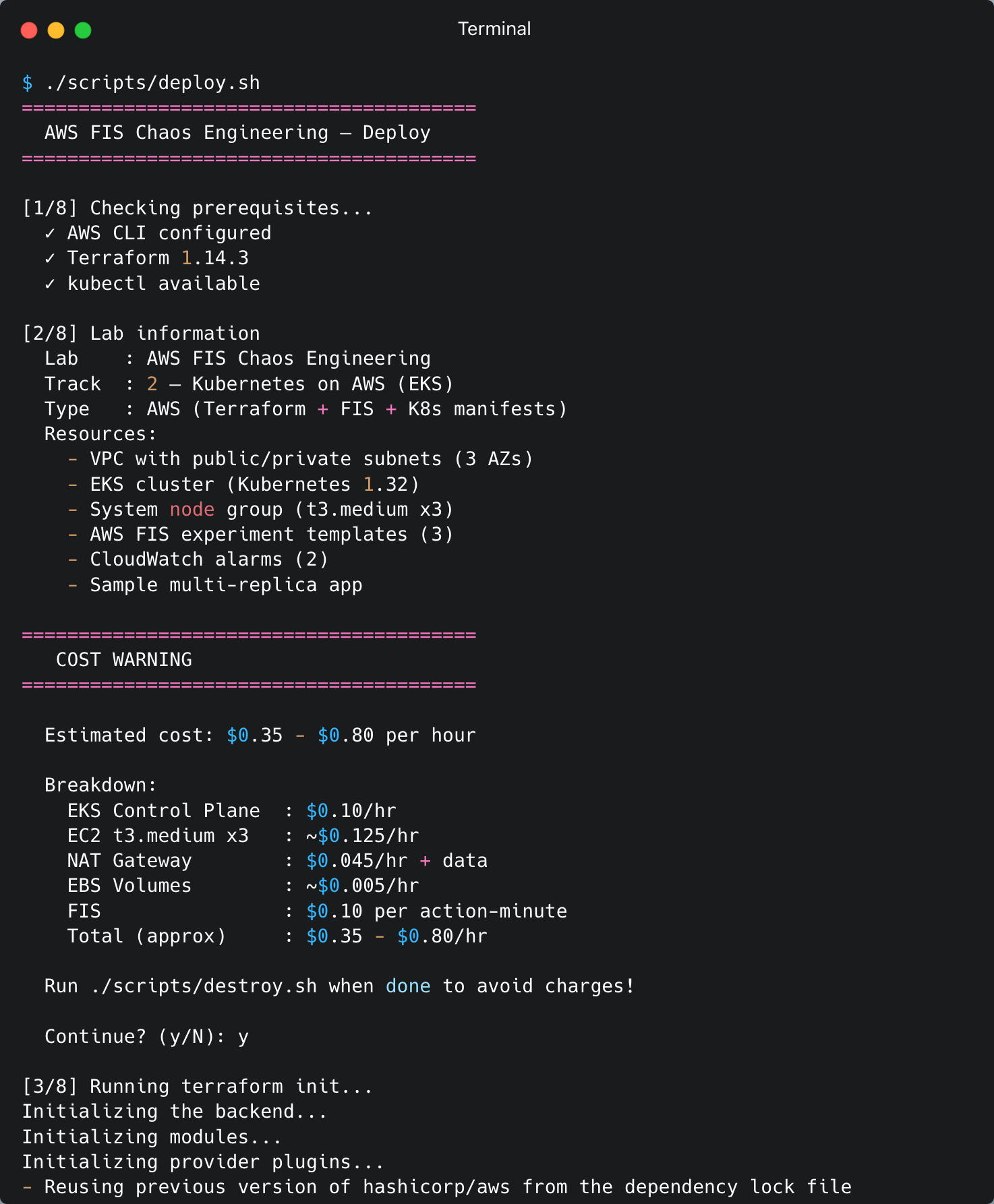
Step 5: Deploy the Lab
Run the deploy script. This script will:
- Validate prerequisites (AWS CLI, Terraform, kubectl)
- Display a cost warning and prompt for confirmation
- Run
terraform initandterraform apply(VPC, EKS, IAM, FIS templates, CloudWatch alarms) - Configure kubeconfig via
aws eks update-kubeconfig - Deploy Kubernetes manifests (namespace, sample app, FIS service account + RBAC)
- Wait for all deployments to become ready
1
./scripts/deploy.sh
The deploy process takes 15-20 minutes (EKS cluster creation + node group + sample app).
Step 6: Verify the Setup
After the deploy completes, verify that all components are running correctly:
1
2
3
4
5
6
7
8
9
10
11
12
13
14
15
16
# Check nodes
kubectl get nodes

# Check all pods in the fis-lab namespace
kubectl get pods -n fis-lab
# Expected: 8 pods (3 frontend + 3 backend-api + 2 database), all Running

# Check the FIS service account
kubectl get serviceaccount fis-experiment-sa -n fis-lab -o yaml
# Verify the eks.amazonaws.com/role-arn annotation is present

# Check FIS experiment templates via AWS CLI
aws fis list-experiment-templates --query "experimentTemplates[].{ID:id,Description:description}" --output table

# Check CloudWatch alarms
aws cloudwatch describe-alarms --alarm-name-prefix "aws-fis-chaos-lab" --query "MetricAlarms[].{Name:AlarmName,State:StateValue}" --output table

FIS experiment templates

Step 7: Run the Experiment — Pod Delete
This experiment deletes one backend-api pod to test Kubernetes self-healing. We will run each step manually via the AWS CLI so you can see exactly what happens behind the scenes.
7a. Check pod status before the experiment
1
kubectl get pods -n fis-lab -l app=backend-api
Expected output — 3 pods Running:
$ kubectl get pods -n fis-lab -l app=backend-api
NAME                           READY   STATUS    RESTARTS   AGE
backend-api-5f887c9798-dl7hp   1/1     Running   0          7m38s
backend-api-5f887c9798-wqbr5   1/1     Running   0          7m38s
backend-api-5f887c9798-xwszt   1/1     Running   0          7m38s
7b. Get the FIS template ID from Terraform output
1
2
3
# Get the template ID for the pod-delete experiment
POD_DELETE_ID=$(terraform -chdir=terraform output -raw fis_template_pod_delete_id)
echo "Template ID: $POD_DELETE_ID"
7c. Inspect the experiment template details
Before running the experiment, review the template configuration:
1
2
3
4
aws fis get-experiment-template --region ap-southeast-1 \
    --id "$POD_DELETE_ID" \
    --query 'experimentTemplate.{Description: description, Actions: actions, Targets: targets, StopConditions: stopConditions}' \
    --output yaml
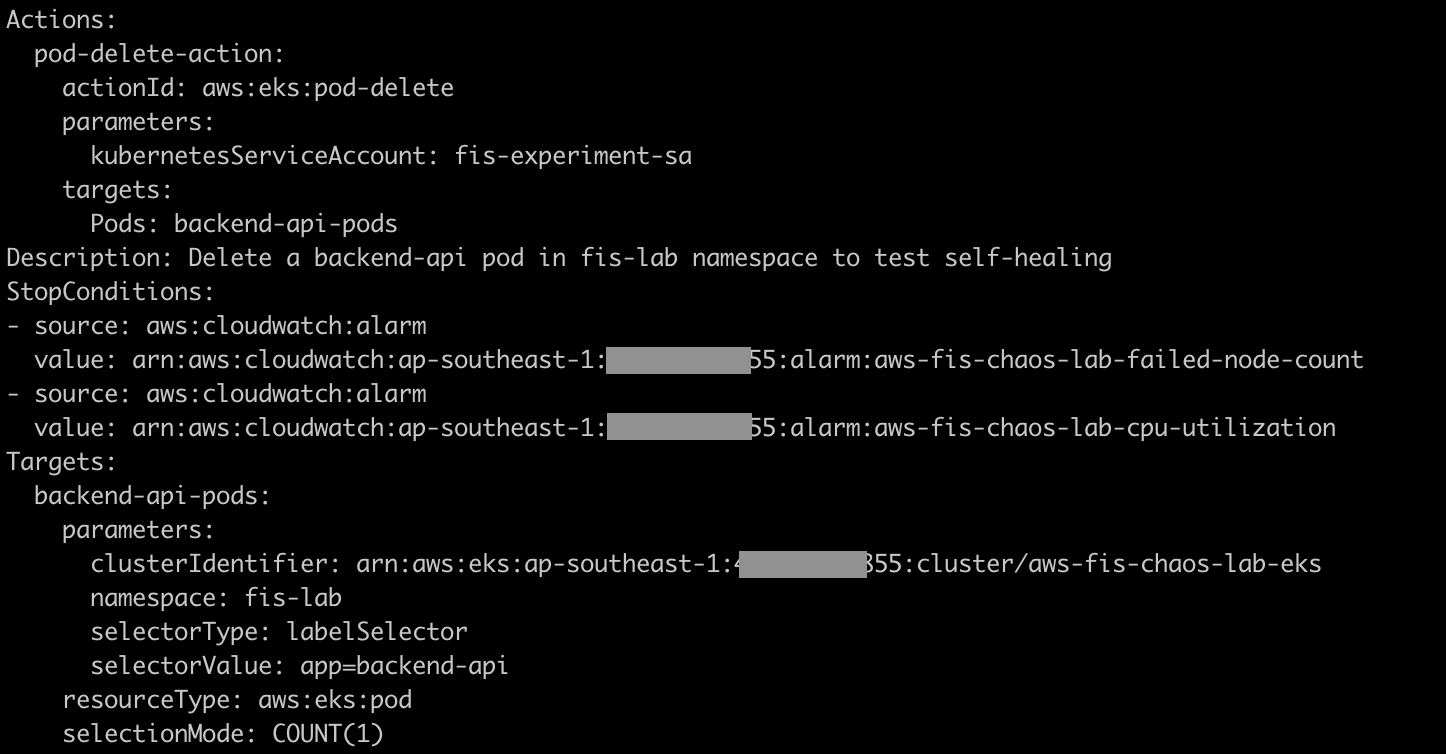
Note the following:
- Action:
aws:eks:pod-delete— FIS will delete the pod - Target: namespace
fis-lab, labelapp=backend-api, selection modeCOUNT(1)— only 1 pod - Stop Conditions: 2 CloudWatch alarms (CPU and failed node count)
7d. Start the experiment
1
2
3
4
5
6
7
8
# Start the experiment and capture the experiment ID
EXPERIMENT_ID=$(aws fis start-experiment \
    --experiment-template-id "$POD_DELETE_ID" \
    --query "experiment.id" \
    --region ap-southeast-1 \
    --output text)

echo "Experiment started: $EXPERIMENT_ID"
7e. Monitor the experiment state
In terminal 1 — watch the experiment status:
1
2
3
4
5
6
7
8
9
10
11
12
13
14
# Poll status every 10 seconds
while true; do
  STATE=$(aws fis get-experiment \
        --id "$EXPERIMENT_ID" \
        --query "experiment.state.status" \
        --region ap-southeast-1 \
        --output text)
  echo "[$(date '+%H:%M:%S')] State: $STATE"

  if [[ "$STATE" == "completed" || "$STATE" == "stopped" || "$STATE" == "failed" ]]; then
    break
  fi
  sleep 10
done
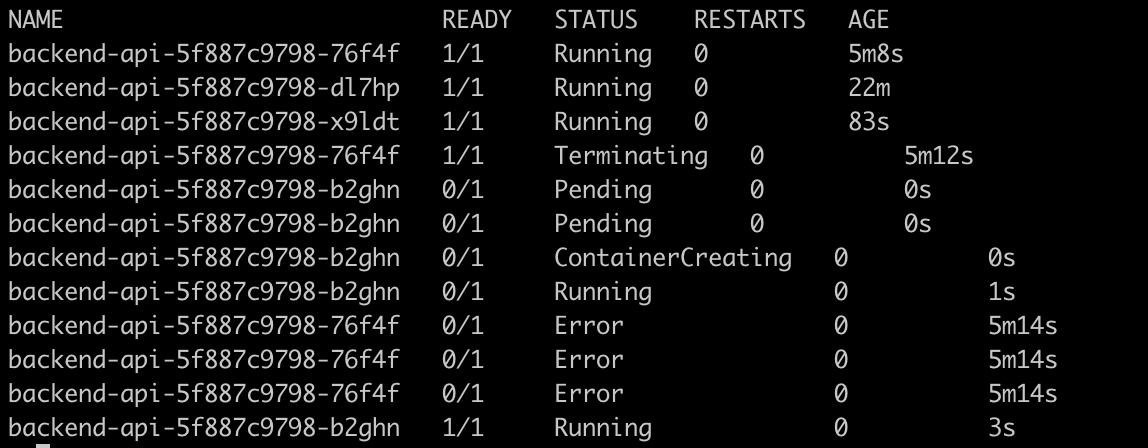
In terminal 2 — observe the pod lifecycle in real time:
1
kubectl get pods -n fis-lab -l app=backend-api -w
You will see like this:
7f. Check the experiment results
1
2
3
4
5
6
7
8
9
10
11
12
13
14
# View detailed experiment results
aws fis get-experiment \
    --id "$EXPERIMENT_ID" \
    --query '{
    State: experiment.state,
    Actions: experiment.actions,
    StartTime: experiment.startTime,
    EndTime: experiment.endTime
  }' \
    --region ap-southeast-1 \
    --output yaml

# Check Kubernetes events
kubectl get events -n fis-lab --sort-by='.lastTimestamp' | tail -10

FIS deleted 1 backend-api pod via the Kubernetes API (using the fis-experiment-sa service account through IRSA). The Kubernetes Deployment controller detected that the replica count was below the desired state (3) and created a new pod. Recovery time is typically 5-15 seconds. Since there are 3 replicas and only 1 was deleted, at least 2 pods remain Running at all times — no downtime.
Step 8: Run the Experiment — Network Latency
This experiment injects 200ms latency (±50ms jitter) into all backend-api pods for 5 minutes. FIS uses ephemeral containers to inject the latency — no sidecar or DaemonSet required.
8a. Measure baseline latency (before the experiment)
Measure the total round-trip time. The absolute numbers include kubectl overhead, but what matters is the difference before and after latency injection:
1
2
3
4
5
6
for i in $(seq 1 5); do
  echo "--- Request $i ---"
  time kubectl exec -n fis-lab deploy/frontend -- \
    wget -qO- --timeout=5 http://backend-api:8080/
  echo ""
done
1
2
3
4
5
6
7
8
9
10
11
12
13
14
15
16
17
18
19
--- Request 1 ---
{"service":"backend-api","status":"healthy","hostname":"backend-api-5f887c9798-b2ghn"}
kubectl exec -n fis-lab deploy/frontend -- wget -qO- --timeout=5   1.08s user 0.46s system 71% cpu 2.158 total

--- Request 2 ---
{"service":"backend-api","status":"healthy","hostname":"backend-api-5f887c9798-x9ldt"}
kubectl exec -n fis-lab deploy/frontend -- wget -qO- --timeout=5   1.02s user 0.27s system 75% cpu 1.697 total

--- Request 3 ---
{"service":"backend-api","status":"healthy","hostname":"backend-api-5f887c9798-x9ldt"}
kubectl exec -n fis-lab deploy/frontend -- wget -qO- --timeout=5   1.00s user 0.26s system 81% cpu 1.556 total

--- Request 4 ---
{"service":"backend-api","status":"healthy","hostname":"backend-api-5f887c9798-x9ldt"}
kubectl exec -n fis-lab deploy/frontend -- wget -qO- --timeout=5   1.01s user 0.25s system 81% cpu 1.549 total

--- Request 5 ---
{"service":"backend-api","status":"healthy","hostname":"backend-api-5f887c9798-b2ghn"}
kubectl exec -n fis-lab deploy/frontend -- wget -qO- --timeout=5   0.99s user 0.25s system 65% cpu 1.890 total
Note the total value from each request. After FIS injects 200ms latency, this number will increase by ~0.2s.
8b. Get the FIS template ID
1
2
NET_LATENCY_ID=$(terraform -chdir=terraform output -raw fis_template_network_latency_id)
echo "Template ID: $NET_LATENCY_ID"
8c. Inspect the experiment template details
1
2
3
4
5
6
7
8
9
aws fis get-experiment-template \
    --id "$NET_LATENCY_ID" \
    --region ap-southeast-1 \
    --query 'experimentTemplate.{
    Description: description,
    Actions: actions,
    Targets: targets
  }' \
    --output yaml
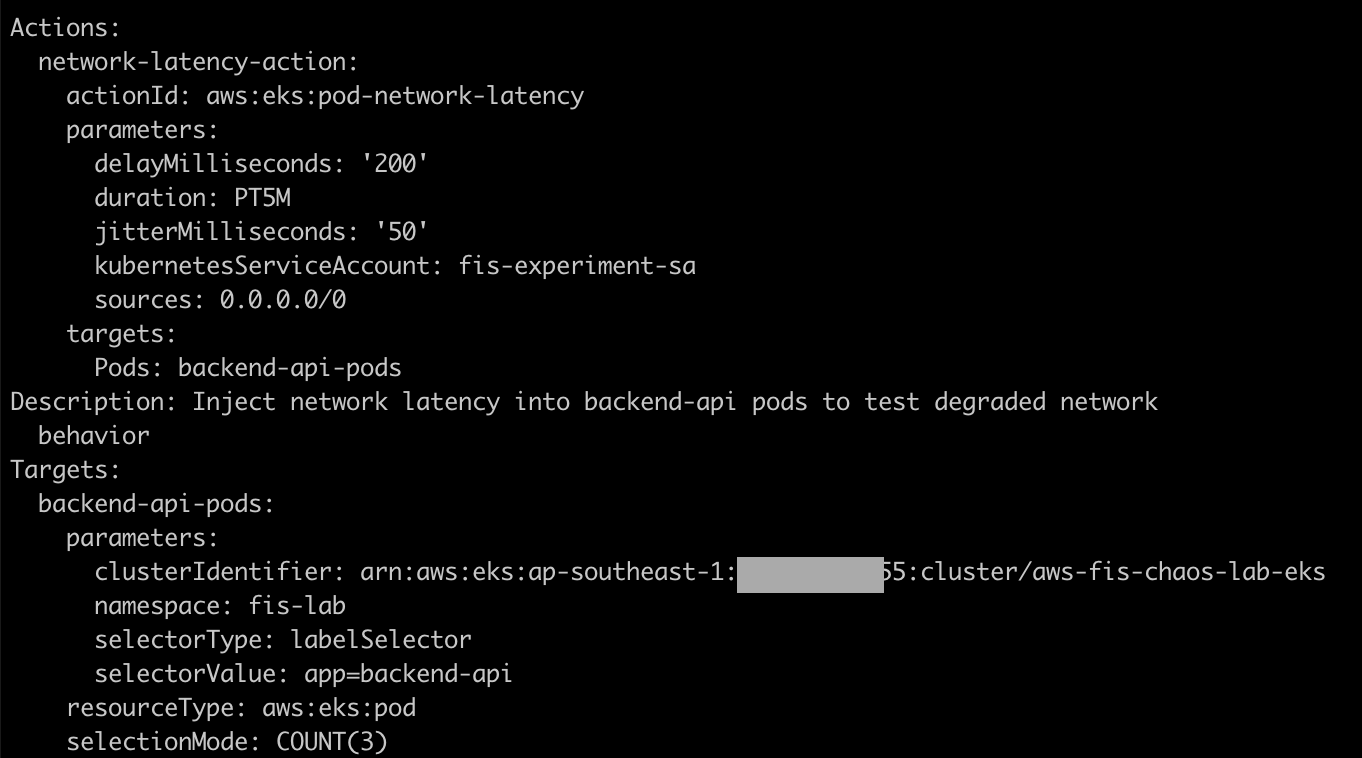
Note the action parameters:
delayMilliseconds: 200 — adds 200ms of latencyjitterMilliseconds: 50 — variation of ±50msduration: PT5M — experiment runs for 5 minutessources: 0.0.0.0/0 — all traffic is affected- Selection mode
COUNT(3)— all 3 backend-api pods
8d. Start the experiment
1
2
3
4
5
6
7
EXPERIMENT_ID=$(aws fis start-experiment \
    --experiment-template-id "$NET_LATENCY_ID" \
    --query "experiment.id" \
    --region ap-southeast-1 \
    --output text)

echo "Experiment started: $EXPERIMENT_ID"
8e. Monitor and measure the latency impact
In terminal 1 — watch the experiment status:
1
2
3
4
5
aws fis get-experiment \
    --id "$EXPERIMENT_ID" \
    --query '{Status: experiment.state.status}' \
    --region ap-southeast-1 \
    --output text
In terminal 2 — measure latency while the experiment is running:
1
2
3
4
5
6
7
8
9
10
# Wait a few seconds for FIS to finish injecting ephemeral containers
sleep 15

# Measure latency — compare the 'total' value with the baseline
for i in $(seq 1 5); do
  echo "--- Request $i ---"
  time kubectl exec -n fis-lab deploy/frontend -- \
    wget -qO- --timeout=5 http://backend-api:8080/
  echo ""
done
Compare the total value with the baseline. A difference of ~0.2s (200ms) is the latency injected by FIS.
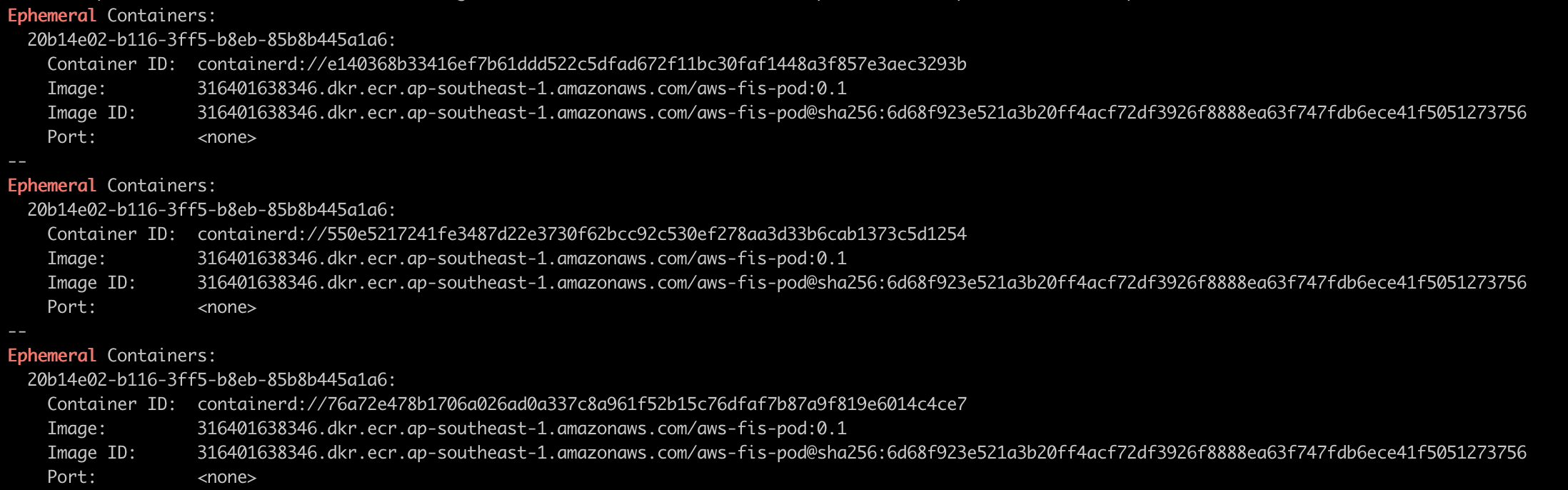
8f. Check the ephemeral containers injected by FIS
1
2
3
4
5
# List pods — notice the ephemeral containers added by FIS
kubectl get pods -n fis-lab -l app=backend-api -o wide

# Describe one of the pods to see the ephemeral container
kubectl describe pod -n fis-lab -l app=backend-api | grep -A 5 "Ephemeral"
8g. Wait for the experiment to complete
1
2
3
4
5
6
7
8
9
10
11
12
13
14
# Poll until complete (experiment runs for 5 minutes)
while true; do
  STATE=$(aws fis get-experiment \
        --id "$EXPERIMENT_ID" \
        --query "experiment.state.status" \
        --region ap-southeast-1 \
        --output text)
  echo "[$(date '+%H:%M:%S')] State: $STATE"

  if [[ "$STATE" == "completed" || "$STATE" == "stopped" || "$STATE" == "failed" ]]; then
    break
  fi
  sleep 30
done
[12:39:00] State: completed
8h. Verify latency returns to normal
After the experiment completes, measure latency again:
1
2
3
4
5
6
for i in $(seq 1 3); do
  echo "--- Request $i ---"
  time kubectl exec -n fis-lab deploy/frontend -- \
    wget -qO- --timeout=5 http://backend-api:8080/
  echo ""
done
The total value should return to the baseline.
What happened: FIS injected an ephemeral container into each backend-api pod. The ephemeral container configured network delay using tc (traffic control). For 5 minutes, all traffic to/from the backend-api pods experienced an additional 200ms ±50ms of latency. After the duration expired, FIS removed the configuration and latency returned to normal. Pods remained Running throughout the experiment — only network performance was degraded, not availability.
Step 9: Run the Experiment — Node Termination
This experiment terminates 34% of instances in the node group (1 out of 3 nodes), one node is actually shut down.
9a. Record the initial state
1
2
3
4
5
# List nodes
kubectl get nodes -o wide

# View pod distribution per node
kubectl get pods -n fis-lab -o wide --sort-by='.spec.nodeName'


Note which node is running which pods — after the experiment, the distribution will change.
9b. Get the FIS template ID
1
2
NODE_TERM_ID=$(terraform -chdir=terraform output -raw fis_template_node_termination_id)
echo "Template ID: $NODE_TERM_ID"
9c. Inspect the experiment template details
1
2
3
4
5
6
7
8
9
aws fis get-experiment-template \
    --id "$NODE_TERM_ID" \
    --region ap-southeast-1 \
    --query 'experimentTemplate.{
    Description: description,
    Actions: actions,
    Targets: targets
  }' \
    --output yaml
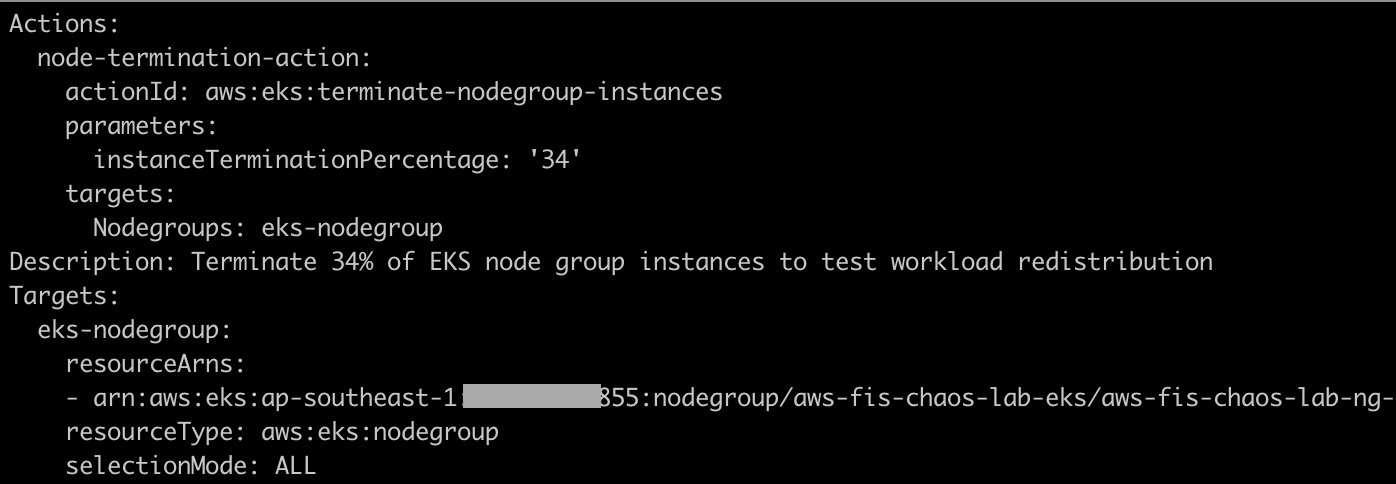
Note the following:
- Action:
aws:eks:terminate-nodegroup-instances - Parameter:
instanceTerminationPercentage = 33— terminates 1 out of 3 nodes - Target: EKS managed node group ARN
- This experiment does not use a service account — FIS calls the EC2 API directly via the Execution Role
9d. Start the experiment
1
2
3
4
5
6
7
EXPERIMENT_ID=$(aws fis start-experiment \
    --experiment-template-id "$NODE_TERM_ID" \
    --query "experiment.id" \
    --region ap-southeast-1 \
    --output text)

echo "Experiment started: $EXPERIMENT_ID"
9e. Monitor the experiment and observe the impact
In terminal 1 — watch the experiment status:
1
2
3
4
5
6
7
8
9
10
11
12
while true; do
  STATE=$(aws fis get-experiment \
        --id "$EXPERIMENT_ID" \
        --query "experiment.state.status" \
        --output text)
  echo "[$(date '+%H:%M:%S')] State: $STATE"

  if [[ "$STATE" == "completed" || "$STATE" == "stopped" || "$STATE" == "failed" ]]; then
    break
  fi
  sleep 10
done
In terminal 2 — observe node status:
1
kubectl get nodes -w

You will see one of the nodes transition to NotReady:
ip-10-4-10-36.ap-southeast-1.compute.internal NotReady <none> 57m v1.32.13-eks-40737a8
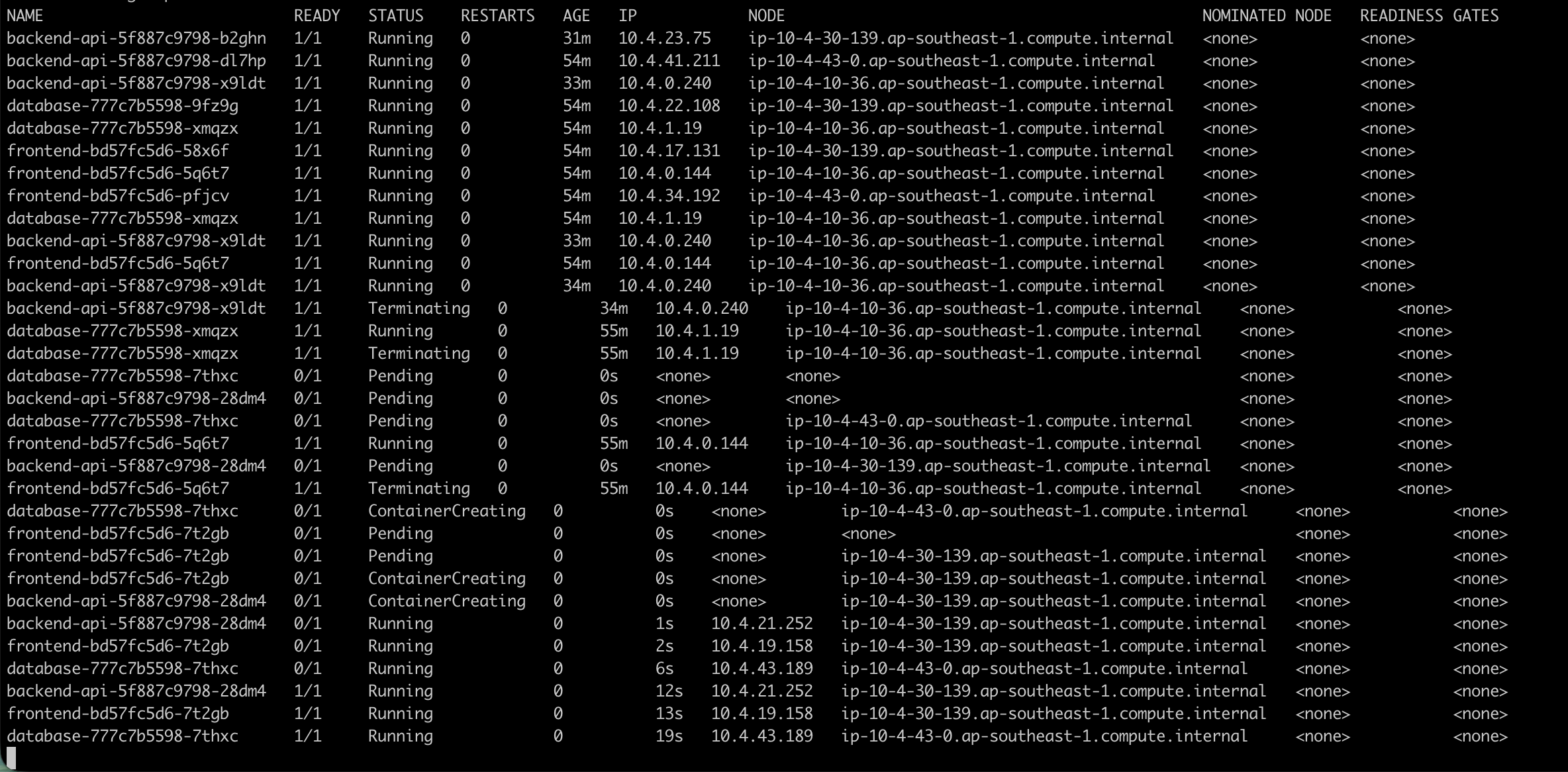
In terminal 3 — observe pod redistribution:
1
kubectl get pods -n fis-lab -o wide -w
9f. Check the results after the experiment completes
1
2
3
4
5
6
7
8
9
10
11
12
13
14
# Check node status — 1 node NotReady or already removed
kubectl get nodes

# Check pods — all pods should be Running on the 2 remaining nodes
kubectl get pods -n fis-lab -o wide --sort-by='.spec.nodeName'

# Check experiment result
aws fis get-experiment \
    --id "$EXPERIMENT_ID" \
    --query '{
    State: experiment.state,
    Actions: experiment.actions
  }' \
    --output yaml


9g. Wait for the new node (Auto Scaling Group recovery)
The EKS managed node group uses an Auto Scaling Group (ASG). After an instance is terminated, the ASG will launch a new instance:
1
2
3
4
5
# Wait 3-5 minutes, then check nodes
kubectl get nodes

# After the new node is Ready, check pods
kubectl get pods -n fis-lab -o wide --sort-by='.spec.nodeName'
What happened: FIS called the EC2 API to terminate 1 instance (34% of 3). The node transitioned to NotReady, and pods on that node entered Terminating state. The Kubernetes scheduler redistributed the pods to the 2 remaining nodes. After a few minutes, the ASG detected that the instance count was below the desired size and launched a new EC2 instance. The new node joined the cluster and the cluster returned to 3 nodes.
Troubleshooting
| Problem | Root Cause | Solution |
|---|---|---|
| FIS experiment fails to start | Insufficient IAM role permissions | Check FIS execution role policies: ensure AWSFaultInjectionSimulatorEKSAccess and AWSFaultInjectionSimulatorNetworkAccess are attached. Run: aws iam list-attached-role-policies --role-name <fis-execution-role> |
| Pod delete does not work | Service account not configured correctly | Check the IRSA annotation: kubectl get sa fis-experiment-sa -n fis-lab -o yaml. Verify that eks.amazonaws.com/role-arn points to the correct IAM role. |
| Network latency not injected | FIS agent/ephemeral container issue | Check pod logs and ephemeral containers: kubectl describe pod <pod-name> -n fis-lab. Ensure the EKS cluster version is >= 1.23 (minimum for FIS pod actions). |
| Stop condition triggers immediately | CloudWatch alarm already in ALARM state | Check alarm state: aws cloudwatch describe-alarms --alarm-name-prefix aws-fis-chaos-lab. Ensure the alarm threshold is not set too low. Reset the alarm if needed. |
| Experiment stuck in “initiating” | EKS cluster not accessible by FIS | Check the cluster endpoint and security groups. Ensure EKS public endpoint access is enabled. Run: aws eks describe-cluster --name <cluster-name> --query "cluster.resourcesVpcConfig" |
| Terraform apply fails | Provider version mismatch | Update providers: terraform init -upgrade. Ensure Terraform >= 1.7 and AWS provider >= 5.0. |
| RBAC permission denied | Role/RoleBinding mismatch | Check RBAC: kubectl describe role fis-experiment-role -n fis-lab and kubectl describe rolebinding fis-experiment-binding -n fis-lab. Ensure all verbs required by FIS are present. |
| Network latency — “Qdisc netem already exists” | Stale tc rules from a previous experiment | Restart pods: kubectl rollout restart deployment/backend-api -n fis-lab. This happens when a previous experiment failed during cleanup. New pods will have a clean network interface. |
| Node termination — pods not rescheduled | Resource limits too restrictive | Check events: kubectl get events -n fis-lab --sort-by='.lastTimestamp'. Ensure the 2 remaining nodes have enough resources to accommodate all pods. |
Cost Estimates
| Resource | Cost per Hour | Notes |
|---|---|---|
| EKS Control Plane | $0.10/hr | Fixed cost per cluster |
| EC2 t3.medium x3 | ~$0.125/hr | 3 instances × $0.0416/hr (ap-southeast-1) |
| NAT Gateway | $0.045/hr + data | Fixed hourly + $0.045/GB data processed |
| EBS Volumes | ~$0.005/hr | gp3 volumes for the node group |
| FIS | $0.10/action-minute | Only charged while an experiment is running |
| Total (approx) | $0.35 - $0.80/hr | Depends on the number of experiments run |
FIS is only charged while an experiment is running ($0.10 per action-minute). The main costs come from the EKS control plane and EC2 instances. Run
./scripts/destroy.shas soon as you finish the lab.
Cleanup
IMPORTANT: Run cleanup immediately after finishing to avoid ongoing charges!
1
./scripts/destroy.sh
This script will:
- Stop all running FIS experiments (
aws fis stop-experiment) - Delete Kubernetes resources (FIS RBAC, sample app,
fis-labnamespace) - Run
terraform destroyto remove all AWS resources (FIS templates, CloudWatch alarms, IAM roles, EKS cluster, VPC) - Verify that all resources have been deleted via
terraform state list
The destroy process takes 10-15 minutes (primarily EKS cluster deletion).
Verify in the AWS Console:
- EKS : Clusters (cluster has been deleted)
- VPC: Your VPCs (lab VPC
10.4.0.0/16has been deleted) - IAM: Roles (no
aws-fis-chaos-lab-*roles remain) - FIS: Experiment templates (no templates remain)
- CloudWatch: Alarms (no
aws-fis-chaos-lab-*alarms remain) - VPC: Elastic IPs (no orphaned EIPs)
References
- AWS Fault Injection Service — User Guide — Complete AWS FIS documentation
- FIS EKS Pod Actions — Actions, requirements, and RBAC configuration for EKS pod experiments
- IAM Roles for FIS Experiments — Trust policy and managed policies for the FIS execution role
- FIS Experiment Template Components — Template structure: actions, targets, stop conditions
- FIS Actions Reference — Complete list of FIS actions including EKS-specific actions
- IRSA — IAM Roles for Service Accounts — Configuring IRSA on EKS
- Chaos Engineering — Principles, Tools, and Implementation — Companion article on chaos engineering principles