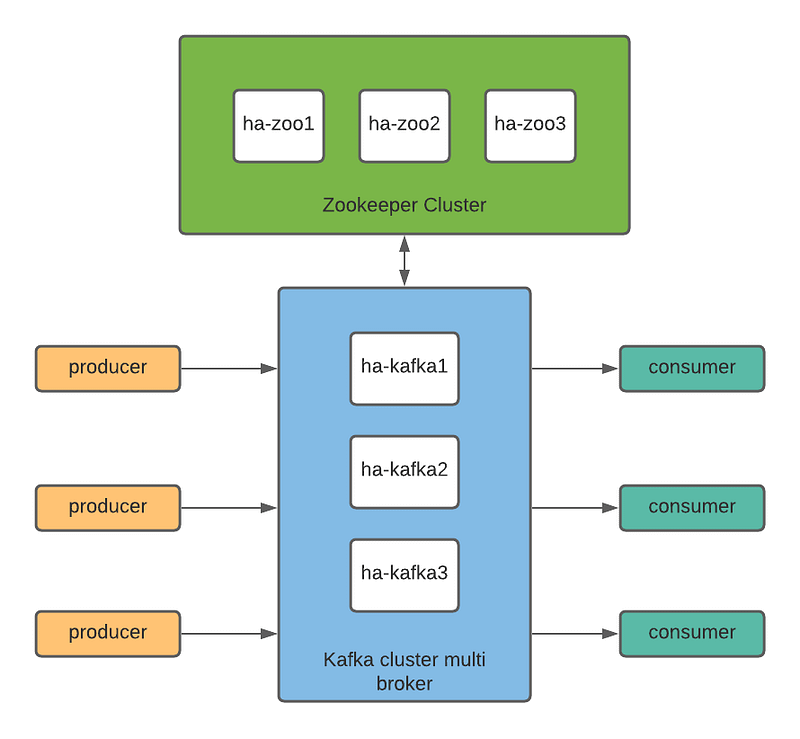
What is apache kafka ?> Apache Kafka is an open-source distributed event streaming platform used by thousands of companies for high-performance data pipelines, streaming analytics, data integration, and mission-critical applications. > https://kafka.apache.org/ What is apache zookeeper?> ZooKeeper is a centralized service for maintaining configuration information, naming, providing distributed synchronization, and providing group services. All of these kinds of services are used in some form or another by distributed applications. > https://zookeeper.apache.org/ Setup Zookeeper Cluster with High Availability- Install java on all node ha-zoo*
1
2
| sudo apt update
apt install -y openjdk-11-jdk
|
- setup dns local on all node ha-zoo*
1
2
3
4
| vi /etc/hosts
10.20.20.51 ha-zoo1
10.20.20.52 ha-zoo2
10.20.20.53 ha-zoo3
|
- download zookeeper on all node ha-zoo*
1
2
| cd /opt
sudo wget https://downloads.apache.org/zookeeper/zookeeper-3.6.2/apache-zookeeper-3.6.2-bin.tar.gz
|
- ekstract zookeeper package on all node ha-zoo*
1
2
3
| sudo tar -xvf apache-zookeeper-3.6.2-bin.tar.gz
sudo mv apache-zookeeper-3.6.2 zookeeper
cd zookeeper
|
- config multiple zookeeper on all node ha-zoo*
1
2
3
4
5
6
7
8
9
| sudo vi conf/zoo.cfg
tickTime=2000
dataDir=/data/zookeeper
clientPort=2181
initLimit=10
syncLimit=5
server.1=ha-zoo1:2888:3888
server.2=ha-zoo2:2888:3888
server.3=ha-zoo3:2888:3888
|
set multiple zookeeper, setup each node- on node ha-zoo1, add the file
1
2
| vi /data/zookeeper/myid
1
|
- on node ha-zoo2, add the file and save
1
2
| vi /data/zookeeper/myid
2
|
- on node ha-zoo3 add the file and save
1
2
| vi /data/zookeeper/myid
3
|
- running zookeeper on all node ha-zoo*
1
| java -cp lib/zookeeper-3.6.2.jar:lib/*:conf org.apache.zookeeper.server.quorum.QuorumPeerMain conf/zoo.cfg
|
1
2
3
4
5
| cd /opt/zookeeper
bin/zkCli.sh -server ha-zoo1:2181
[zk: ha-zoo3:2181(CONNECTED) 0] ls /
[zookeeper]
[zk: ha-zoo3:2181(CLOSED) 3] quit
|
well done, zookeeper cluster running well. And then we will setup kafka cluster.
Setup Kafka Cluster Multi Broker with High Availability
- Install java on all node ha-kafka*
1
2
| apt update
apt install -y openjdk-11-jdk
|
- setup dns local on all node ha-kafka*
1
2
3
4
5
6
7
| vi /etc/hosts
10.20.20.41 ha-kafka1
10.20.20.42 ha-kafka2
10.20.20.43 ha-kafka3
10.20.20.51 ha-zoo1
10.20.20.52 ha-zoo2
10.20.20.53 ha-zoo3
|
- Create folder inside -
/opt- and download kafka
1
2
| mkdir /opt/kafka
curl https://downloads.apache.org/kafka/2.6.0/kafka_2.13-2.6.0.tgz -o /opt/kafka/kafka.tgz
|
1
2
| cd /opt/kafka
tar xvfz kafka.tgz --strip 1
|
- create directory for kafka data on all node
1
2
| sudo mkdir -p /data/kafka/log
chown -R ubuntu:ubuntu /data/kafka/
|
- setup zookeeper connect on server configuration, exec on all node kafka cluster, edit this file
1
| vi bin/config/server.properties
|
1
2
3
| log.dirs=/data/kafka/log
num.partitions=3
zookeeper.connect=ha-zoo1:2181,ha-zoo2:2181,ha-zoo3:2181
|
- set unique broker id each node kafka cluster, exec on ha-kafka1
1
2
| vi bin/config/server.properties
broker.id=0
|
1
2
| vi bin/config/server.properties
broker.id=1
|
1
2
| vi bin/config/server.properties
broker.id=2
|
- create kafka as a service
1
2
3
4
5
| vi /etc/systemd/system/kafka.service
[Unit]
Description=Kafka
Before=
After=network.target
|
1
2
3
4
5
| [Service]
User=ubuntu
CHDIR=
ExecStart=/opt/kafka/bin/kafka-server-start.sh /opt/kafka/config/server.properties
Restart=on-abort
|
1
2
| [Install]
WantedBy=multi-user.target
|
1
| sudo systemctl daemon-reload
|
- start and enable kafka service
1
2
3
| sudo systemctl start kafka.service
sudo systemctl enable kafka.service
sudo systemctl status kafka.service
|
if no problem, continue to create a topic
1
2
| root@ha-kafka1:/opt/kafka# bin/kafka-topics.sh --create --bootstrap-server ha-kafka1:9092 ha-kafka2:9092 ha-kafka3:9092 --topic test-multibroker
Created topic test-multibroker.
|
1
2
| root@ha-kafka1:/opt/kafka# bin/kafka-topics.sh --list --bootstrap-server ha-kafka1:9092 ha-kafka2:9092 ha-kafka3:9092
test-multibroker
|
1
2
| root@ha-kafka1:/opt/kafka# ls /data/kafka/log/
cleaner-offset-checkpoint log-start-offset-checkpoint meta.properties recovery-point-offset-checkpoint replication-offset-checkpoint test-multibroker-0 test-multibroker-2
|
Thanks.