Kubernetes Taint and Tolerations
Taints are like "warning labels" on the door, while Tolerations are like "special keys" that guests have to enter those rooms.

What is Taints and Tolerations?
Imagine it like an apartment with several rooms. Some rooms have “special rules” - for example, VIP rooms only for premium guests, or maintenance rooms that are being repaired. Taints are like “warning labels” on the door, while Tolerations are like “special keys” that guests have to enter those rooms.
In Kubernetes:
- Taints = “Rejection” labels on Nodes that prevent Pods from being scheduled there
- Tolerations = “Special permissions” on Pods to still be scheduled on Nodes that have Taints
Why Do We Need Taints and Tolerations?
Problems Without Taints/Tolerations:
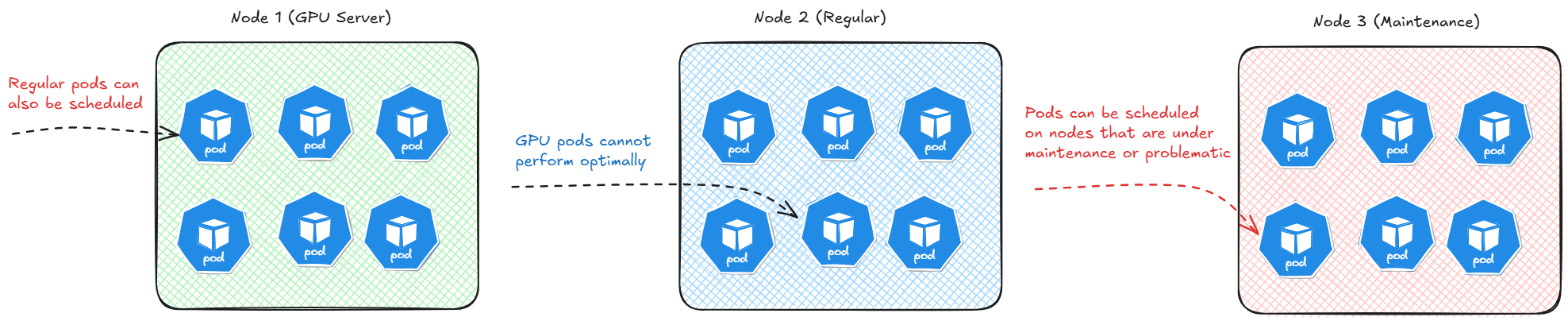
Assumptions:
- Node1 (GPU Server): Regular pods can also be scheduled
- Node2 (Regular Server): GPU pods cannot perform optimally
- Node3 (Maintenance): Pods can be scheduled on nodes that are under maintenance or problematic
Solution With Taints/Tolerations:
- Node1 (GPU + Taint): Only Pods with GPU Toleration
- Node2 (Regular): Regular pods
- Node3 (Taint: NoSchedule): No new Pods
Types of Taint Effects
- NoSchedule: New pods cannot be scheduled on the node
- PreferNoSchedule: Scheduler tries to avoid scheduling new pods on the node
- NoExecute: Existing pods will be evicted from the node
Diagrams: Taints and Tolerations
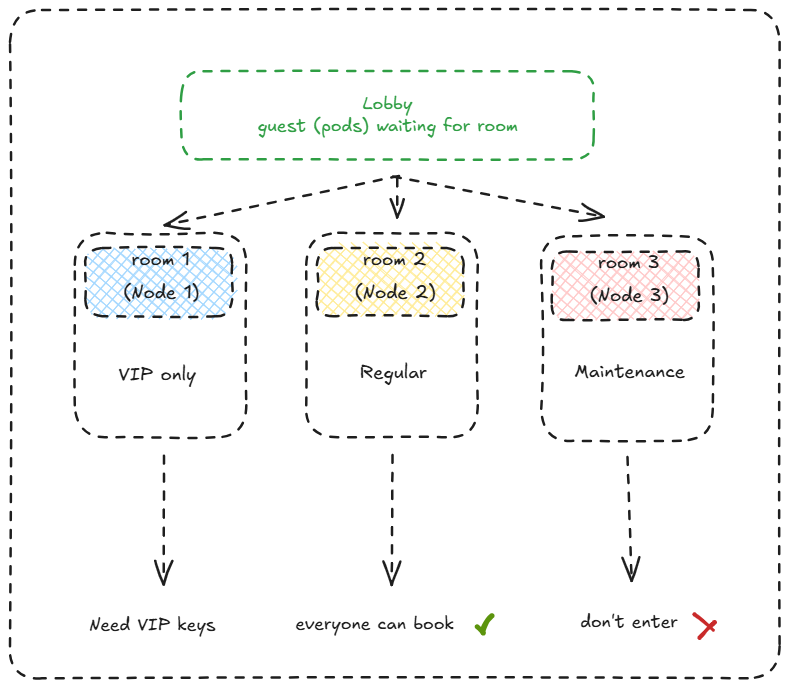
1. Room 1 (Node 1) - VIP Only
- Marked with blue checkered pattern
- Exclusive access for VIP guests only (pods with specific tolerations)
- “Need VIP keys” = Pods must have the correct toleration to enter this node
- Kubernetes equivalent: Node with restrictive taints requiring specific tolerations
2. Room 2 (Node 2) - Regular
- Marked with yellow pattern
- Standard node without any taints
- “Everyone can book” = All pods can be scheduled here
- Kubernetes equivalent: Clean node without any scheduling restrictions
3. Room 3 (Node 3) - Maintenance
- Marked with pink pattern
- Node currently under maintenance
- “Don’t enter” = Pods cannot enter (likely has NoSchedule/NoExecute taint)
- Kubernetes equivalent: Node with maintenance taint preventing new pod scheduling
Scheduling Flow Diagram
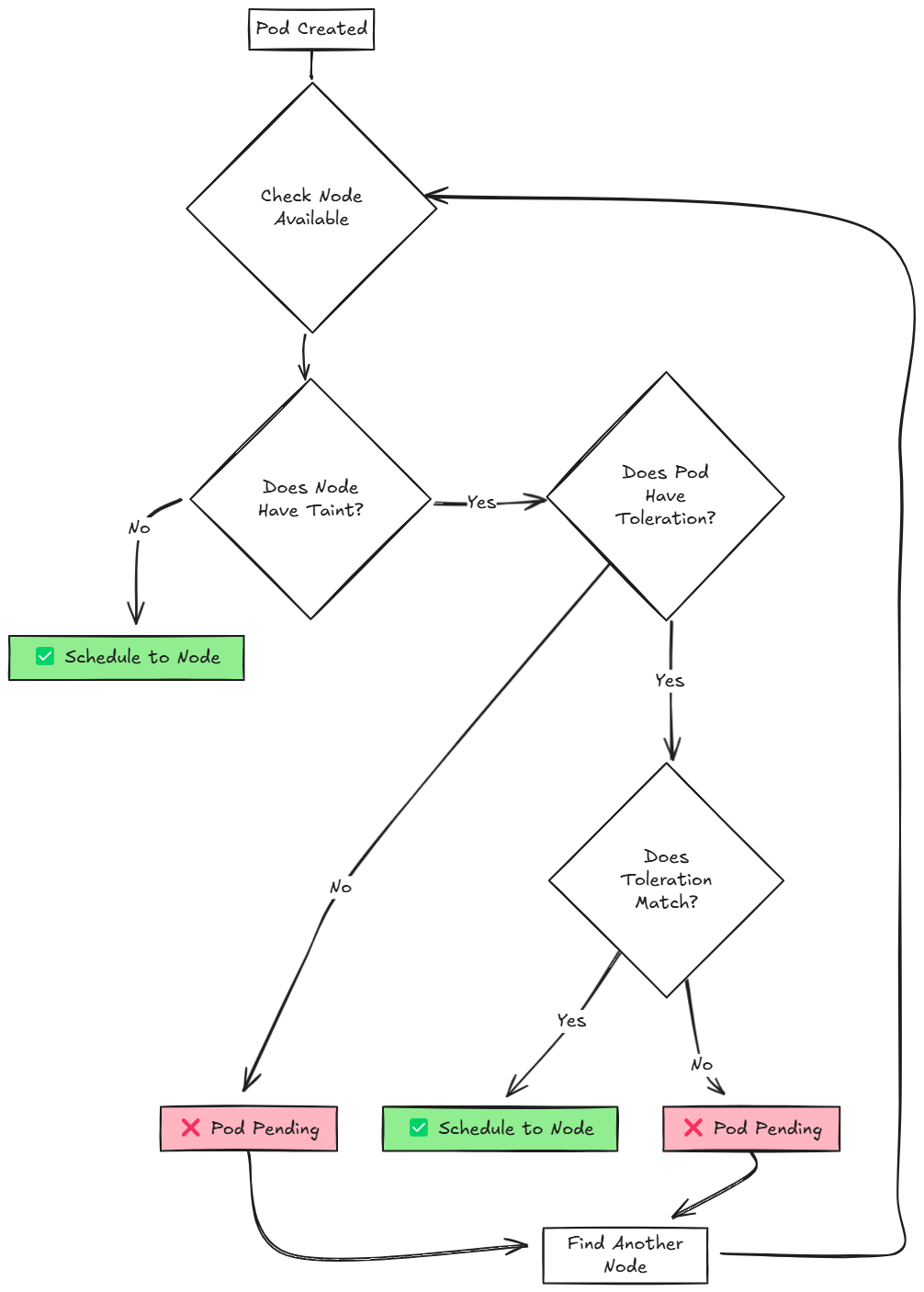
Flowchart Process Breakdown
1. Pod Creation
- Start Point: Pod Created
- A new pod is submitted to the Kubernetes API server and needs to be scheduled**.
2. Node Availability Check
- Decision Point: Check Node Available
- The scheduler evaluates available nodes in the cluster
- If no nodes are available, the process loops back to wait for available nodes
3. Taint Evaluation
- Decision Point: Does Node Have Taint?
- The scheduler checks if the candidate node has any taints applied
Toleration Operators Comparison
Equal Operator
The Equal operator performs exact matching between the toleration and taint. Characteristics:
- Requires exact value match
- Most restrictive matching
- Precise control over pod placement
- Default operator if not specified
syntax:
1
2
3
4
5
tolerations:
- key: "example-key"
  operator: "Equal"
  value: "example-value"
  effect: "NoSchedule"
Use Cases:
- When you need specific pods on specific nodes
- Dedicated node pools for particular applications
- Strict resource isolation requirements
Exists Operator
The Exists operator only checks for the presence of the taint key, ignoring the value. Characteristics:
- Key-only matching
- More flexible than Equal
- Ignores taint values completely
- Useful for broad tolerance policies
syntax:
1
2
3
4
tolerations:
- key: "example-key"
  operator: "Exists"
  effect: "NoSchedule"
Use Cases:
- When you want to tolerate any value for a specific key
- Broader tolerance policies
- Simplified taint management
Hands-On Lab: Implementasi Taints and Tolerations
Lab 1: Create Node with Taint
1
2
3
4
5
6
7
8
9
10
11
12
13
14
15
16
17
18
# view available nodes
$ kubectl get nodes
NAME           STATUS   ROLES           AGE   VERSION
controlplane   Ready    control-plane   20m   v1.33.0
node01         Ready    <none>          19m   v1.33.0

# view taint on nodes
$ kubectl describe nodes | grep -i taints
Taints:             node-role.kubernetes.io/control-plane:NoSchedule
Taints:             <none>

# Add taint to node01
$ kubectl taint nodes node01 environment=production:NoSchedule
node/node01 tainted

$ kubectl describe nodes | grep -i taint
Taints:             node-role.kubernetes.io/control-plane:NoSchedule
Taints:             environment=production:NoSchedule
Lab 2: Deploy Pod without Toleration (will fail)
1
2
3
4
5
6
7
8
9
10
11
12
apiVersion: v1
kind: Pod
metadata:
  name: pod-without-toleration
  labels:
    app: demo-no-toleration
spec:
  containers:
    - name: nginx
    image: nginx:alpine
    ports:
        - containerPort: 80
1
2
3
4
5
6
7
8
9
10
11
12
13
14
15
16
17
18
19
$ kubectl create -f nginx.yaml
pod/pod-without-toleration created

$ kubectl get pod
NAME                     READY   STATUS    RESTARTS   AGE
pod-without-toleration   0/1     Pending   0          2s

# Cek status pod
$ kubectl describe pod pod-without-toleration | grep -iA3 events
Events:
  Type     Reason            Age   From               Message
    ----     ------            ----  ----               -------
  Warning  FailedScheduling  62s   default-scheduler  0/2 nodes are available: 1 node(s) had untolerated taint {node-role.kubernetes.io/control-plane: }, 1 node(s) had untolerated taint {environment: production}. preemption: 0/2 nodes are available: 2 Preemption is not helpful for scheduling.

# Cek status node
$ kubectl get nodes -o custom-columns=NAME:.metadata.name,TAINTS:.spec.taints
NAME           TAINTS
controlplane   [map[effect:NoSchedule key:node-role.kubernetes.io/control-plane]]
node01         [map[effect:NoSchedule key:environment value:production]]
Lab 3: Deploy Pod with Toleration (success)
1
2
3
4
5
6
7
8
9
10
11
12
13
14
15
16
17
apiVersion: v1
kind: Pod
metadata:
  name: pod-with-toleration
  labels:
    app: demo-with-toleration
spec:
  tolerations:
    - key: "environment"
    operator: "Equal"
    value: "production"
    effect: "NoSchedule"
  containers:
    - name: nginx
    image: nginx:alpine
    ports:
        - containerPort: 80
1
2
3
4
5
6
7
8
9
10
11
12
# Apply manifest
$ kubectl create -f nginx-toleration.yaml

# Cek pod
$ kubectl get pods -l app=demo-with-toleration
NAME                  READY   STATUS    RESTARTS   AGE
pod-with-toleration   1/1     Running   0          47s

$ kubectl get pods -o wide
NAME                     READY   STATUS    RESTARTS   AGE     IP           NODE     NOMINATED NODE   READINESS GATES
pod-with-toleration      1/1     Running   0          3m21s   172.17.1.2   node01   <none>           <none>
pod-without-toleration   0/1     Pending   0          10s     <none>       <none>   <none>           <none>

Lab 4: Taint with NoExecute
- Prevents NEW pods from being scheduled
- EVICTS existing pods that don’t tolerate the taint
- Most disruptive taint effect
- Can specify
tolerationSecondsfor graceful eviction
Example Scenario: Emergency Node Drain
Initial State - Pods Running
1
2
3
4
5
kubectl get pods -o wide
NAME        STATUS    NODE
app-1       Running   node01
app-2       Running   node01
database    Running   node01
Apply NoExecute Taint
1
kubectl taint nodes node01 emergency=hardware-failure:NoExecute
Immediate Result
1
2
3
4
5
6
7
8
9
10
11
kubectl get pods -o wide
NAME        STATUS        NODE
app-1       Terminating   node01
app-2       Terminating   node01
database    Terminating   node01

# After a few seconds
NAME        STATUS    NODE
app-1       Running   node02    # Rescheduled
app-2       Running   node02    # Rescheduled
database    Pending   <none>      # Waiting for suitable node
Pod with NoExecute Toleration (Survives)
1
2
3
4
5
6
7
8
9
10
11
12
13
14
apiVersion: v1
kind: Pod
metadata:
  name: emergency-service
spec:
  tolerations:
    - key: "emergency"
    operator: "Equal"
    value: "hardware-failure"
    effect: "NoExecute"
    tolerationSeconds: 300  # Tolerate for 5 minutes
  containers:
    - name: service
    image: nginx
Behavior with tolerationSeconds
1
2
3
4
5
6
7
8
9
# Immediately after taint
kubectl get pods -o wide
NAME               STATUS    NODE
emergency-service  Running   node01  # Still running

# After 300 seconds (5 minutes)
kubectl get pods -o wide
NAME               STATUS        NODE
emergency-service  Terminating   node01  # Now being evicted
Summary
Taints and Tolerations are powerful mechanisms for:
- Controlling pod scheduling with precision
- Isolating specialized workloads (GPU, database, etc.)
- Performing node maintenance without downtime
- Optimizing resource allocation